Free LocalBusiness Schema Generator: Create JSON-LD for Your Local Business Website (2026)

By the Amica Solutions Team · Published 19 November 2026 · Google facts checked 19 November 2026 against Google’s own Help pages. Amica Solutions builds Amica Directory and these free tools, so the screenshots are from our own tools and our own listing.

LocalBusiness schema is JSON-LD code that tells Google your business name, address, phone, hours and location. Google requires name and address and recommends telephone, url, opening hours, geo and price range. The free Amica Directory generator writes the code from a short form; paste it into your page’s <head> and test it with the Rich Results Test.

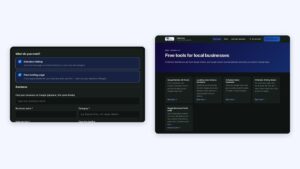
Localbusiness schema generator filled in for amica solutions next to the free tools hub

The schema generator with our details (left) and the free tools hub (right). Screenshots: Amica Directory, 19 Nov 2026.

Your Google Business Profile tells Google about you on Maps. Schema does the same job on your own website, in the language search engines read best. Most small business websites we audit do not have it at all.

Key takeaways

  • Schema describes your business in code Google reads.
  • Required: name and address.
  • Match your Business Profile exactly.
  • Test with the Rich Results Test.
  • Free generator with 32 business types.

What is LocalBusiness schema?

LocalBusiness schema is a small block of JSON-LD code on your website that describes your business: name, address, phone, hours, location and links. Google says this structured data can help it show “a prominent Google knowledge panel with details about a business” (Google Search Central).

PropertyGoogle saysExample
nameRequiredAmica Solutions Pvt. Ltd.
addressRequired (PostalAddress)Street, city, state, PIN, country
telephoneRecommended; include country and area code+91 94113 39575
urlRecommended; the location’s pagehttps://amicasolution.com/
openingHoursSpecificationRecommendedMon–Sat 10:00–19:00
geoRecommended; at least 5 decimal places30.35128, 78.07534
priceRangeRecommended; under 100 characters₹₹

How do you generate the code for free?

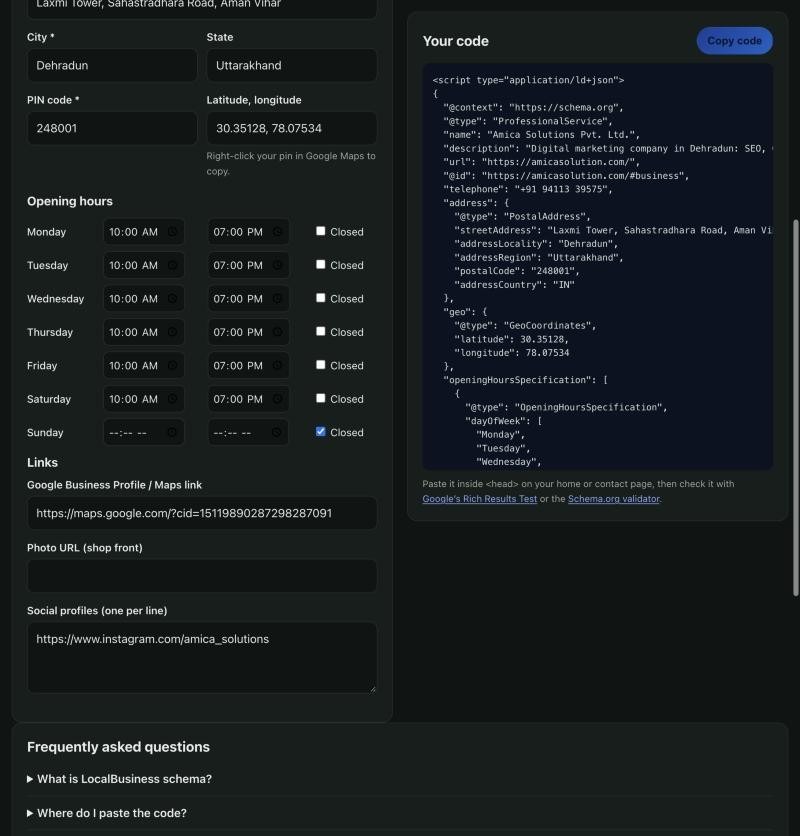
The free generator writes the code from a simple form. It offers 32 business types (from AC repair, electrician and dentist to restaurant, hotel and travel agency), groups days with the same hours, warns about missing fields and has a copy button. We filled it in for our own business to make the screenshot below.

StepWhat you do
1Pick the closest type of business
2Enter name, phone, website and a short description
3Enter the full address, PIN and latitude/longitude (right-click your pin in Google Maps)
4Set opening hours for each day
5Add your Google Maps link and social profiles
6Copy the code and paste it inside <head> on your home or contact page
Localbusiness schema generator filled in for amica solutions with the json-ld code output

The schema generator filled in for our business, with the code on the right. Screenshot: Amica Directory, 19 Nov 2026.

How do you check it works?

Test it after adding. Google recommends validating with the Rich Results Test, using URL Inspection to check how Google sees the page, and allowing several days for crawling. The details in the schema must match your Google Business Profile exactly. Schema helps Google understand your details; it is not a ranking switch on its own. For WordPress steps, see how to add LocalBusiness schema in WordPress.

Generate your schema

Free tool: LocalBusiness Schema Generator

Fill in a short form and copy ready JSON-LD for your website. 32 business types, grouped hours, warnings, free and in your browser.

Generate my schema codeAsk us on WhatsApp

Frequently asked questions

What is LocalBusiness schema?

JSON-LD code on your website that tells search engines your business name, address, phone, hours and profiles in a reliable format.

Google requires name and address, and recommends telephone, url, openingHoursSpecification, geo and priceRange.

Inside the <head> of your home or contact page, one block per location.

Schema helps Google understand and trust your details, but it is not a ranking switch on its own. The details must match your Business Profile.

Paste your page URL into Google’s Rich Results Test or the Schema.org validator after adding the code.

Chat With Us on WhatsApp

Send us your question and we reply on WhatsApp.

Opens WhatsApp with your message to +91 94113 39575.

Recent Posts

Scroll to Top