Google Maps Rank Grid: Why Your Ranking Changes Every Kilometre, and How to Check It (2026)
By the Amica Solutions Team · Published 19 November 2026 · Google facts checked 19 November 2026 against Google’s own Help pages. Amica Solutions builds Amica Directory and these free tools, so the screenshots are from our own tools and our own listing.
Your Google Maps ranking changes with the searcher’s location, because distance is one of Google’s three local ranking factors. A rank grid checks your keyword from many points around you and shows where you are in the top 3, visible, or missing. The free Amica audit runs a grid from 25 spots 1 km apart.
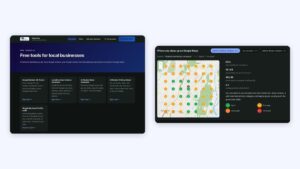
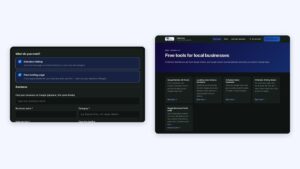
Our own 7×7 rank grid (left) and the example the audit uses to explain it (right). Screenshots: Amica Directory, 19 Nov 2026.
“We are number one on Google!” says almost every owner who searches from their own counter. Then a customer in the next colony searches the same words and sees three other shops. Both are telling the truth.
Key takeaways
Distance is a Google ranking factor.
A rank grid shows your position across your area.
Our own grid: top 3 in 14 of 49 spots.
Category, reviews and posts widen the green area.
No fake extra locations.
Why does your Google Maps ranking change by location?
Google Maps shows different businesses to people in different places, because distance is one of Google’s three local ranking factors. Google says “Distance refers to how far each business is from the customer who’s searching”, alongside relevance and prominence (Google Business Profile Help). So checking your rank from your own shop tells you almost nothing about a customer three kilometres away.
What is a rank grid?
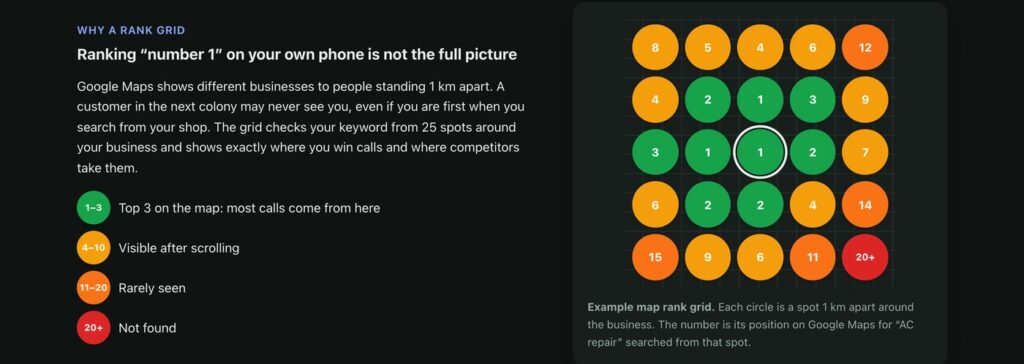
A rank grid searches your keyword from many points around your business and records your Maps position at each one. The free Amica audit uses a grid with points 1 km apart and colours each point:
Colour
Position
What it means
Green
1–3
Top 3 on the map: most calls come from here
Yellow
4–10
Visible after scrolling
Orange
11–20
Rarely seen
Red
20+
Not found
How the audit explains a rank grid: each circle is a spot 1 km apart, the number is the Maps position there. Screenshot: Amica Directory, 19 Nov 2026.
How do you read a rank grid?
Here is our own grid for “digital marketing company” in Dehradun (7×7, 1 km apart).
Metric
Our result
How to read it
Map visibility
63%
The report’s overall visibility score for this search
Spots in the top 3
14 of 49
Strong near the office
Spots where we appear at all (top 20)
49 of 49
Present everywhere, but not always visible
Average position where found
4.7
Just below the top 3 on average
The pattern is typical: green near the office, yellow and orange further out. The report’s advice for this pattern: more reviews, a well-matched primary category and regular posts usually push the green area wider.
Our own audit: 7×7 grid for “digital marketing company”, top 3 in 14 of 49 spots, average position 4.7. Screenshot: Amica Directory, 19 Nov 2026.
How do you rank in a wider area?
To widen the area where you rank: make sure your primary category matches the keyword, keep reviews coming from customers in outer areas, post regularly, and add services and areas to your description. Do not create extra profiles at addresses where you do not serve customers; Google’s guidelines allow one profile per location (Google guidelines).
Why is my Google Maps ranking different on another phone?
Distance is a ranking factor, so results change with the searcher’s location. Personal search history can also play a part.
What is a Google Maps rank grid?
A map of positions for one keyword, checked from many points around your business, so you can see where you appear in the top 3 and where you disappear.
How do I check my Google Maps ranking for free?
Request the free Amica Directory audit: it checks your keyword from 25 spots around your business.
How can I rank in a wider area?
A matching primary category, steady reviews, regular posts and a description naming your services and areas usually help. Distance itself cannot be changed.
Can I create profiles in other areas to rank there?
No. Google allows one profile per real location; virtual offices are not eligible.