
How to Create an Online Test Series Website for Your Coaching Institute (2026)
By the Amica Solutions Team · Published 16 November 2026 · Facts checked 16 November 2026. Amica Solutions builds websites for coaching institutes and makes the MCQ Test Portal shown here.
To create an online test series website, start with a WordPress site on your own domain, add a test portal plugin, and set up five pages: a test series catalogue, free tests, a student login (“My Tests”), current affairs, and a privacy request page. Then link them from your main menu, connect payments, and turn on practice pages so Google can find your questions.

The Test Series page and student login on our own site. Screenshots: amicasolution.com
A test series website is not a separate app with your logo pasted on it. It is your coaching institute’s own website, with tests, results and current affairs living next to your courses, batches and contact details. Students who come for a free test see your faculty and your results on the same site, and that is where admissions start.
This guide is about the website itself: the pages, the menu, login, branding, Google and speed. For making the tests, read ऑनलाइन टेस्ट सीरीज़ कैसे बनाएँ; for payments, how to sell test series online.
Key takeaways
- Build on your own domain with WordPress 6.4+ and PHP 8.1+; the MCQ Test Portal adds the test features as a plugin.
- Five core pages: Test Series, Free Tests, My Tests (login), Current Affairs and Privacy request. Put Current Affairs in the main menu.
- Practice pages and single question pages give Google something to rank; questions without an explanation are kept out of Google.
- Set language, fonts and colours once; fonts load from your own site.
- See it working on our demo, then try it on your own site with the 1-month free demo.
What pages does an online test series website need?
Five pages do most of the work, and the plugin creates or fills them for you. Activation creates My Tests, Test Series and Privacy request; Free Tests, Paid Tests and Current Affairs each take one shortcode:
| Page | Shortcode | What students do there |
|---|---|---|
| Test Series | | Browse free, paid and practice series |
| Free Tests | | Search and start free tests |
| Paid Tests | | Unlock paid tests |
| My Tests | | Log in, see attempts, progress and purchases |
| Current Affairs | | Daily, monthly and yearly sets, topics, exams and states |
| Privacy request | | Ask for their data to be deleted |
Here is the Test Series page on our own site, inside our normal header and footer:
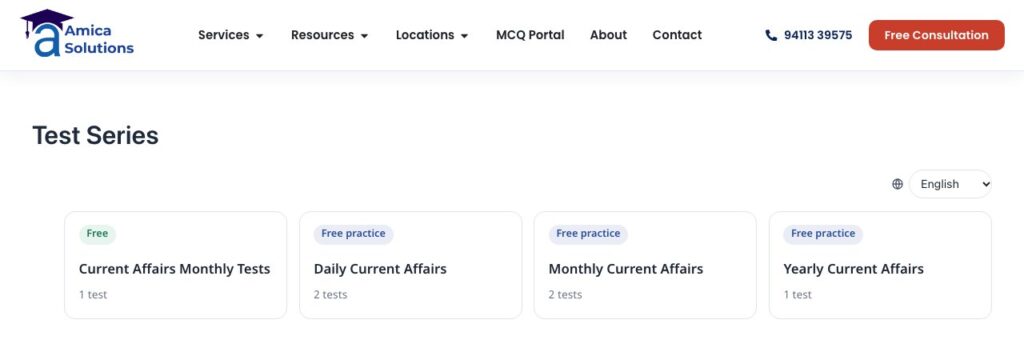
Test Series page on amicasolution.com (16 November 2026). Screenshot: amicasolution.com
Any single test can also sit inside a page or blog post with , which works well as a quick quiz at the end of an article.
How should the menu link to tests and current affairs?
Put Current Affairs and your tests in the main menu, where students look first. Both coaching institutes using the portal did exactly that. Shri RAJ IAS has “Current Affairs” and “Test Archives” in its menu and a green Current Affairs button; Inspiration Study Circle has “UPSC Current Affairs” (both seen on 16 November 2026):

Current affairs in the main menu: Shri RAJ IAS (top) and Inspiration Study Circle. Screenshots: shrirajias.com, inspirationstudycircle.com
Keep the student login (“My Tests”) one tap away on phones, for example in the header or the footer, because returning students go there first.
How do students log in and track their progress?
Through the My Tests page: students register with their name and mobile number, or log in with a password or a one-time code. Whoever fills a short form to see answers, download a PDF or start a test becomes a student and stays logged in on that phone for a year. My Tests then shows their attempts, scores, rank and progress.

My Tests: log in or register. Screenshot: amicasolution.com
Login codes can go by SMS (Fast2SMS, MSG91, 2Factor) or WhatsApp. That setup is covered in the students, OTP and WhatsApp guide.
How do you make the website look like your institute?
Set the student language, the fonts and two colours once, in MCQ Portal → Settings → General. Students can switch between English and हिंदी, questions can show Hindi and English together, and the settings screen notes that fonts load from your own site, not Google’s servers:

Settings → General: language, font and colours. Screenshot: MCQ Test Portal
The portal uses your theme’s header and footer, and works with classic themes such as Hello Elementor and with block themes. If you want a page to look different, a developer can copy its template into your theme and change it there.
How do you get the website found on Google?
Publish practice pages and single question pages with explanations, and let current affairs add fresh pages every day. The SEO practice settings decide how many questions sit on a page, how answers open, and when the name and mobile form appears:
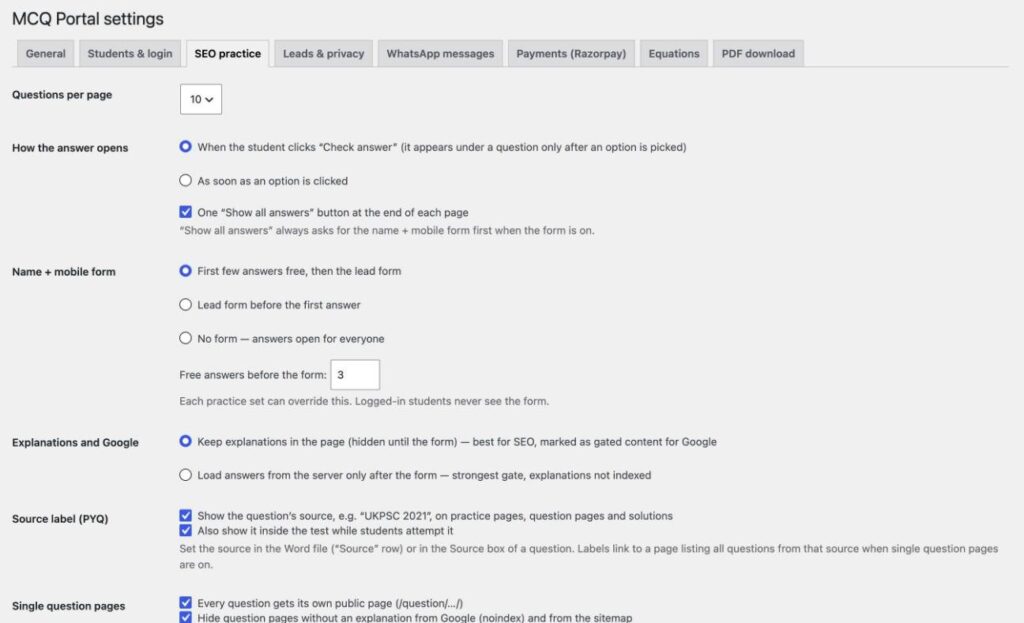
Settings → SEO practice. Screenshot: MCQ Test Portal
- Practice sets: public pages with 10 questions per page by default, answers on “Check answer”.
- Single question pages: every question can get its own page; questions without an explanation are kept out of Google and the sitemap.
- Gated explanations: explanations can stay in the page, hidden until the form, and marked for Google as gated content in the way Google’s paywalled content guidance describes.
- Source labels: a label such as “UKPSC 2021” links to all questions from that source.
- Current affairs: day, month, topic, exam and state pages are added as you upload.
This is what a practice page looks like on our demo:
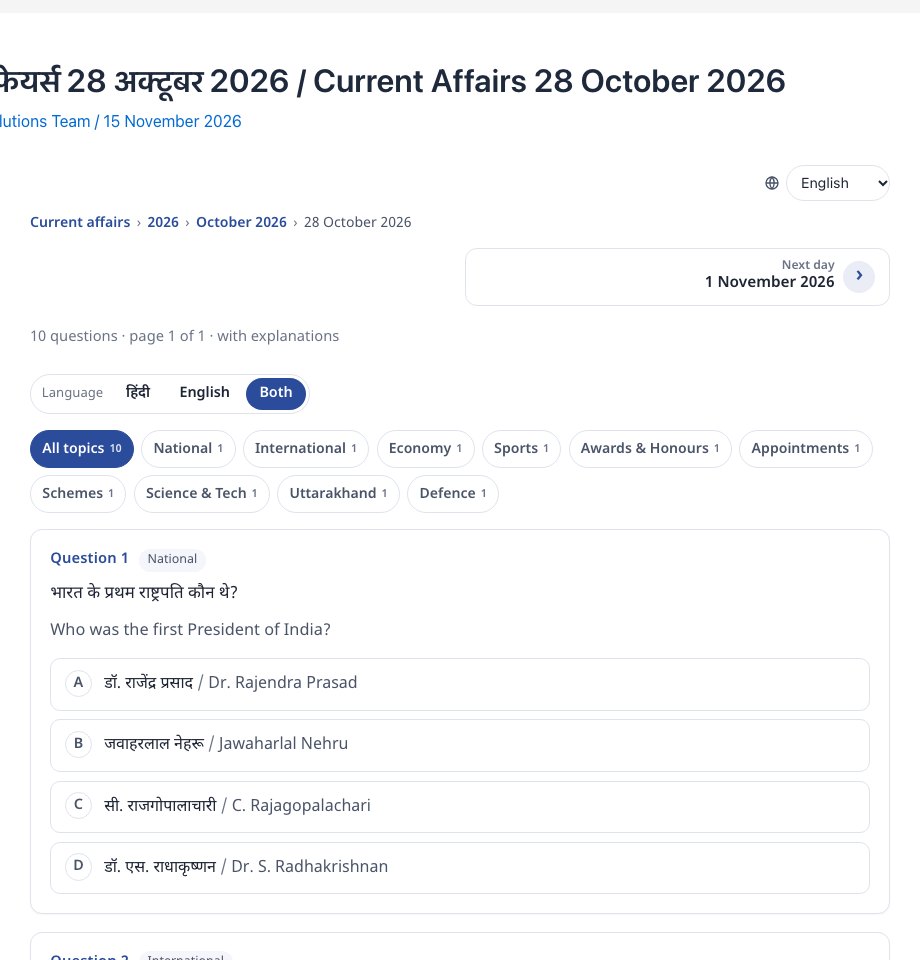
A practice page on our demo. Screenshot: amicasolution.com
What technical checklist should the website meet?
A recent WordPress, PHP 8.1 or newer, clean permalinks, HTTPS, and background jobs that actually run.
| Item | Why it matters |
|---|---|
| WordPress 6.4+ and PHP 8.1+ | The plugin’s minimum versions |
| Permalinks set to “Post name” | Needed for practice pages and the test player |
| HTTPS on your own domain | Student logins and payment pages should never run without it |
| A real server cron job | Auto-submit, PDF building and messages run on time; the dashboard warns if they do not |
| Speed plugins checked | Since version 1.4.3, test pages are sent past plugins that delay scripts (WP Meteor, Rocket Loader and others) |
| Phone-friendly theme | Most students take tests on phones |
The step-by-step setup is in the getting started guide. If you do not have a website yet, our website development team can build one with the test portal included.
How do you fill the website with tests and current affairs?
Upload Word files. Tests come from question files with one table per question (how to bulk upload MCQs from Word), and current affairs come from a daily file with a date and topics (daily current affairs quiz guide). The same uploads build state-wise, exam-wise and subject-wise current affairs pages, monthly sets and an automatic monthly test.
How can you see a working test series website before you start?
Browse our demo, then ask for the 1-month free demo on your own website.
- Test Series, Free Tests, My Tests and Current Affairs on amicasolution.com.
- Take the demo test, no login needed.
- Read about the MCQ Test Portal.
We switch the portal on for your website for a month and build your first test from one of your Word files.
How does the portal handle maths equations?
Equations come straight from your Word file and reach students as sharp images, in Hindi and English, with no maths software needed on their phones.
- From Word: equations made with Word’s Insert → Equation, or LaTeX typed between
$…$(or$$…$$on its own line), are read during the upload. - Drawn once, saved as images: the equation is drawn in your browser while you import and saved on your site as an SVG image plus a PNG copy. Students load a small image, so fractions, powers and matrices look the same on every phone.
- Spoken alt text in two languages: each equation carries a description, for example “A equals the 2 by 2 matrix Row 1: 1 2 Row 2: 3 4” and “ए बराबर 2 बाय 2 आव्यूह पंक्ति 1: 1 2 पंक्ति 2: 3 4”, from our demo test.
- Edit by hand: the question editor has a visual equation editor and a LaTeX box.
- In PDFs too: downloadable PDFs keep the equations.
- MathType: MathType equations come in as pictures; convert them in Word (MathType → Convert Equations) for sharp results.
Our Class 12 Maths demo was made from one Word file: 10 questions, 126 equations, no errors in the preview. Open it on your phone to see how it looks:

Equations in our demo test on a phone: fractions, powers and a matrix, in Hindi and English. Screenshot: amicasolution.com
Frequently asked questions
Do I need a separate website for my test series?
No. The MCQ Test Portal runs inside your existing WordPress website, using your header, footer and domain, so tests sit next to your courses and contact details.
Which pages should a test series website have?
At least Test Series, Free Tests, My Tests (student login), Current Affairs and a Privacy request page. The plugin creates or fills each with a shortcode.
Will the website work with Elementor?
Yes. It works inside classic themes such as Hello Elementor and with block themes, and the coaching websites shown in this article use Elementor.
Can Google index my questions?
Yes. Practice pages and single question pages are public. Questions without an explanation are kept out of Google, and explanations can be marked as gated content when they sit behind the lead form.
Is there a free trial?
Yes. Amica Solutions offers a 1-month free demo of the MCQ Test Portal on your own website. Message +91 94113 39575 on WhatsApp.
Sources (checked 16 November 2026)
- MCQ Test Portal: getting started guide and the plugin’s settings screens (version 1.9.0)
- Google Search Central: Subscription and paywalled content structured data
- Shri RAJ IAS and Inspiration Study Circle websites


