
How to Run a Daily Current Affairs Quiz on Your Coaching Website (2026 Guide)
By the Amica Solutions Team · Published 16 November 2026 · Facts checked 16 November 2026. Amica Solutions builds the MCQ Test Portal used on the coaching websites shown below.
To run a daily current affairs quiz on your coaching website, write each day’s questions in a Word file with the date and a topic for each question, upload it to a test portal on your site, and share the link every morning. Students practise with instant answers and explanations in Hindi or English, and monthly sets, PDFs and a monthly test build themselves from the daily sets.
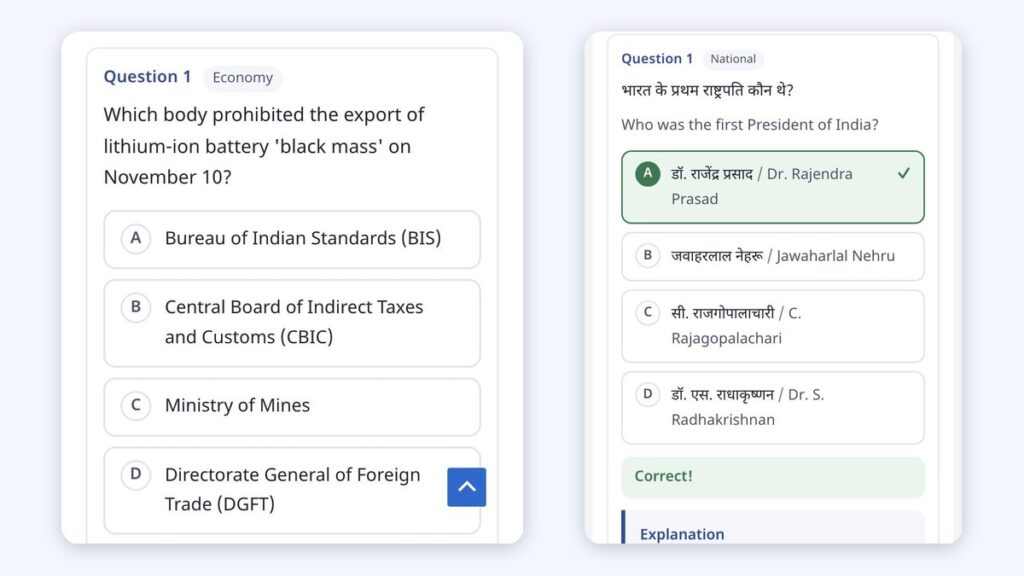
Left: Shri RAJ IAS daily quiz. Right: answer check on our demo. Screenshots: shrirajias.com and amicasolution.com
Ask any civil services aspirant what they do first in the morning, and many will say current affairs. Right now that habit usually takes them to a big national website or a Telegram channel, not to the coaching institute they actually trust.
A daily quiz on your own website changes that. It is small, it is free, and it gives students a reason to open your site every day. Below are two coaching institutes doing it today, and the exact way to set it up.
Key takeaways
- One Word file a day: each question gets a topic, and the file gets a “Current Affairs Date”.
- Students get a Hindi / English / Both switch, topic filters, “Check answer” and an explanation for every question.
- Full notes articles can sit under the MCQs, with MCQ PDFs and Notes PDFs for the day, month and year.
- The same upload builds state-wise, exam-wise and topic-wise pages, plus an automatic monthly test.
- Try it on your own site with the 1-month free demo from Amica Solutions.
Why should a coaching institute run its own daily current affairs quiz?
Because it turns a once-a-month visitor into a daily one, on your own website, under your own name. Inspiration Study Circle in Dehradun built its daily page around exactly that promise: “रोज़ सुबह नया सेट · Free”, 20 questions a day in Hindi and English, with explanations, and a big “आज का सेट हल करें” button (seen on 16 November 2026):
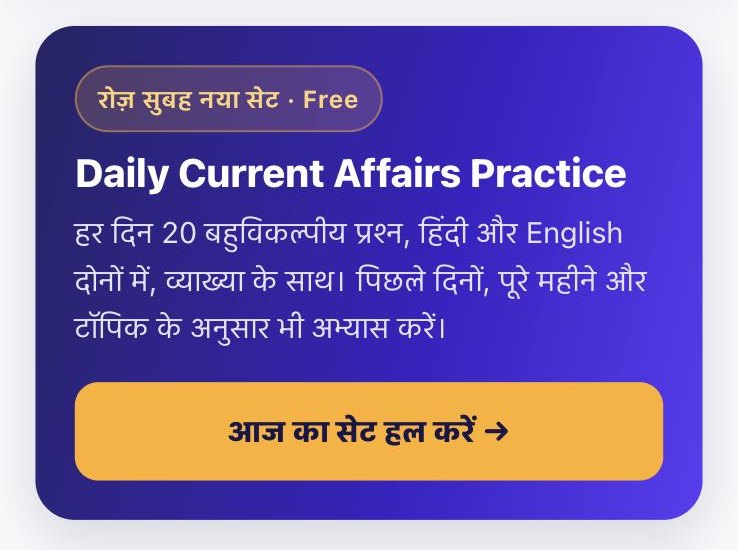
Inspiration Study Circle: a new free set every morning (16 November 2026). Screenshot: inspirationstudycircle.com
A daily habit like this is also the best place to show your paid courses and mock test series, which we cover in how to sell test series online.
What should a good daily current affairs quiz page include?
Questions in both languages, instant answers with explanations, topic filters, and easy links to other days. This is how each part works in the MCQ Test Portal:
| Feature | Why students need it |
|---|---|
| हिंदी / English / Both switch | Each student reads in the language of their exam |
| Topic filters with counts | Practise only Economy or Polity when short of time |
| “Check answer” and explanation | Learn the fact behind the question, not just A/B/C/D |
| Notes articles under the MCQs | Read the full background for each news story |
| Previous / next day, calendar | Catch up on missed days in one tap |
| MCQ PDF and Notes PDF | Revise offline before the exam |
| Monthly and yearly sets, monthly test | Revise a whole month in one timed test |
Here is Shri RAJ IAS’s 14 November 2026 set on a phone: 20 questions with explanations, a language switch and topic filters (Economy 5, Science & Tech 3, Polity & Governance 3 and more):
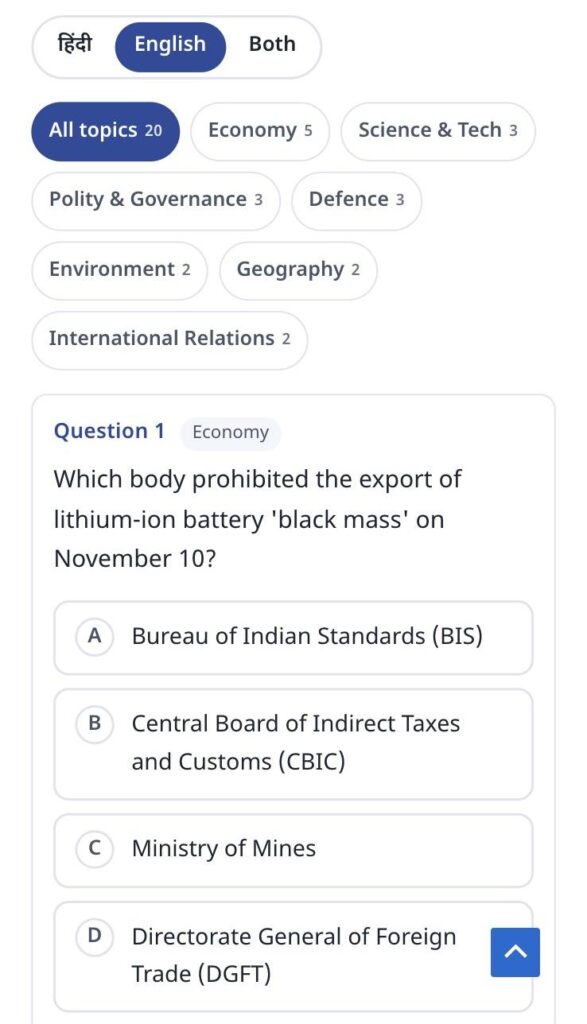
Shri RAJ IAS, 14 November 2026: language switch, topic filters and the first question. Screenshot: shrirajias.com
And this is what a student sees after choosing an answer and tapping “Check answer” on our demo day:
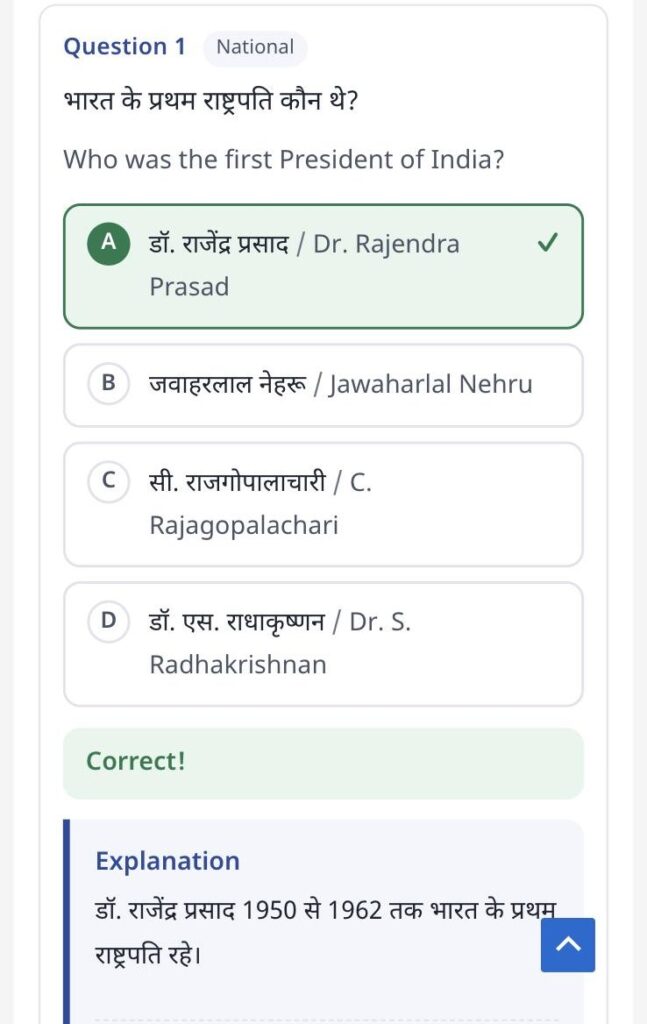
Our demo: the answer is checked and the explanation appears. Screenshot: amicasolution.com
How do you publish a day's quiz?
Write the day’s questions in Word, upload the file, and share the link.
- Write the questions as two-column tables (Question, Option, Answer, Solution) with a
Topicrow such as National, Economy or Sports. Add a Test Info table with aCurrent Affairs Daterow, for example 28-10-2026. - Upload in MCQ Portal → Current Affairs. You can drop several days’ files at once; the date comes from the file or its name.
- Publish straight away, or save as a draft to check first.
- Share the day’s link on your WhatsApp groups. The portal can also send today’s link on WhatsApp at a fixed hour, only to students who ticked the marketing consent box, in line with the consent records India’s Digital Personal Data Protection Act, 2023 expects.
The file format is explained step by step in how to bulk upload MCQs from Word.
How do you add notes with the quiz?
Upload a second Word file with the day’s articles; each article starts with a Heading 1 title and gets its own page. The day page then shows an “On this page” list: the MCQ practice first, then every article. Shri RAJ IAS published six articles with its 14 November quiz:
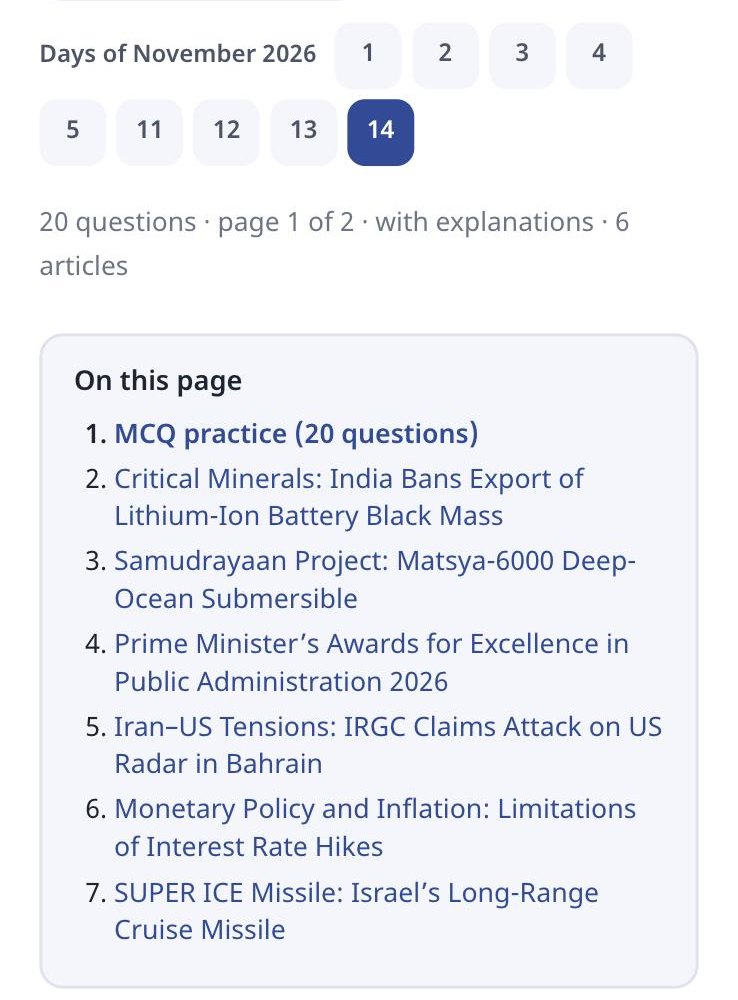
Shri RAJ IAS: MCQs plus six notes articles on one day page. Screenshot: shrirajias.com
Headings, lists, tables, pictures and Word equations in the article are kept, and the day, month and year each get a Notes PDF. Details: current affairs and notes guide.
Can the same quiz be filed state-wise, exam-wise and subject-wise?
Yes. Optional rows in the same Word file put each question on extra pages, so one upload serves several kinds of students.
| Filed by | How | Example page |
|---|---|---|
| Topic / subject | Topic row (sub-topics with >) | Economy current affairs |
| Exam | Exam row: UKPSC, BPSC, RAS, or “All exams” | /exam/ukpsc/ |
| State | State row: English or Hindi name, or UK, UP, MP | /state/uttarakhand/ (“उत्तराखंड करंट अफेयर्स”) |
All 36 states and union territories are ready with Hindi names. A state PCS coaching can therefore run one daily quiz for every student and still give each exam its own page:

The hub with “Current affairs by exam” and “by state” sections. Screenshot: MCQ Test Portal
How do monthly sets and the monthly test work?
They build themselves. Every daily set is added to that month’s set and the year’s set, with MCQ PDFs. When a month ends, a timed monthly test is made from all its topics, with rank and a leaderboard. On 15 November 2026, Inspiration Study Circle’s current affairs page showed 300 questions for November, 388 for 2026, and an October monthly test created this way.
Where should the questions come from?
From primary sources, written in your own words, with the date in the question. Government announcements on the Press Information Bureau are a common starting point. Write each question yourself rather than copying another coaching’s or publisher’s quiz, put the date of the event in the question (as Shri RAJ IAS does: “on November 10”), and add a one-line source in the explanation. Students trust a quiz that tells them where a fact came from.
How can you try it on your own website?
Open our demo day now, then ask for the 1-month free demo with your own current affairs file.
- Try the demo quiz and the current affairs hub.
- See real daily sets on Shri RAJ IAS and Inspiration Study Circle.
- Read about the MCQ Test Portal.
Send us one day’s Word file. We set up the portal on your website for a month, publish that day as your first quiz, and you see the whole flow with your own content.
How does the portal handle maths equations?
Equations come straight from your Word file and reach students as sharp images, in Hindi and English, with no maths software needed on their phones.
- From Word: equations made with Word’s Insert → Equation, or LaTeX typed between
$…$(or$$…$$on its own line), are read during the upload. - Drawn once, saved as images: the equation is drawn in your browser while you import and saved on your site as an SVG image plus a PNG copy. Students load a small image, so fractions, powers and matrices look the same on every phone.
- Spoken alt text in two languages: each equation carries a description, for example “A equals the 2 by 2 matrix Row 1: 1 2 Row 2: 3 4” and “ए बराबर 2 बाय 2 आव्यूह पंक्ति 1: 1 2 पंक्ति 2: 3 4”, from our demo test.
- Edit by hand: the question editor has a visual equation editor and a LaTeX box.
- In PDFs too: downloadable PDFs keep the equations.
- MathType: MathType equations come in as pictures; convert them in Word (MathType → Convert Equations) for sharp results.
Our Class 12 Maths demo was made from one Word file: 10 questions, 126 equations, no errors in the preview. Open it on your phone to see how it looks:

Equations in our demo test on a phone: fractions, powers and a matrix, in Hindi and English. Screenshot: amicasolution.com
Frequently asked questions
How do I add a daily current affairs quiz to my website?
Install a test portal such as the MCQ Test Portal on your WordPress site, write each day’s questions in Word with a Current Affairs Date and a Topic for each question, and upload the file under MCQ Portal → Current Affairs.
Can the quiz be in Hindi and English?
Yes. Each question can carry Hindi and English, and students choose हिंदी, English or Both on the page. The choice is remembered.
Can I give PDFs of the daily current affairs?
Yes. Each day, month and year gets an MCQ PDF, and a Notes PDF when you upload notes, with your logo and watermark.
Can current affairs be shown state-wise or exam-wise?
Yes. Add State and Exam rows in the Word file and the questions appear on pages such as Uttarakhand current affairs or UKPSC current affairs, as well as the main daily set.
Is there a free trial?
Yes. Amica Solutions offers a 1-month free demo of the MCQ Test Portal on your own website. Message +91 94113 39575 on WhatsApp.
Sources (checked 16 November 2026)


