
Google Business Profile Buttons: How to Set Up Call, WhatsApp, Booking and Website So They Bring Enquiries
By the Amica Solutions Team · Published 15 November 2026 · Facts checked 15 November 2026 against Google Business Profile Help and WhatsApp Help, linked below.
Your Google Business Profile can show Call, Directions, Chat (WhatsApp or text), Book online and Website buttons. Add a WhatsApp click-to-chat link under Edit profile, then Contact, then Chat; check any “Book online” button you did not set up, because some have been reported broken since 9 November 2026; and tag your Website link so you can see how many customers it really sends.
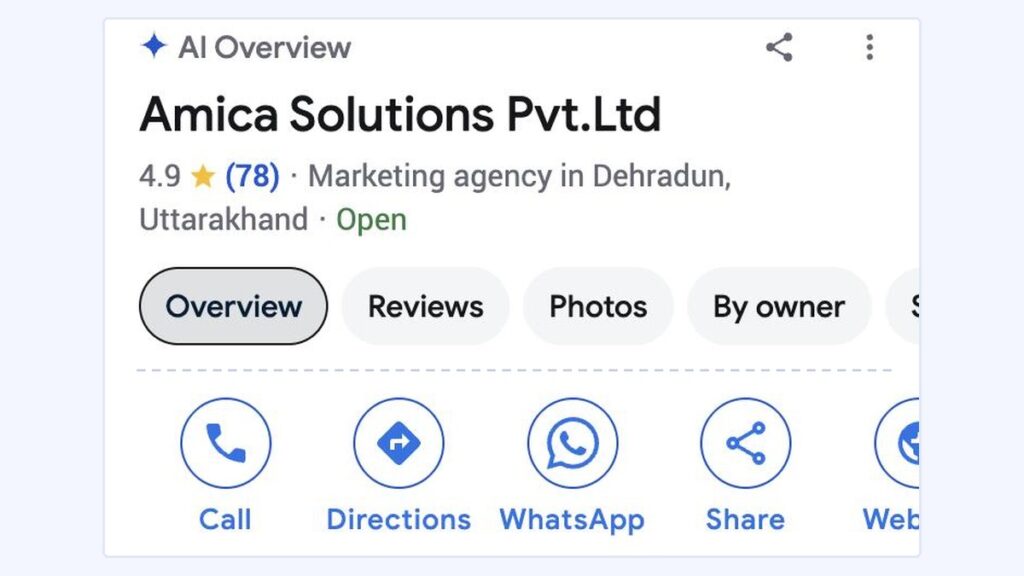
Our own listing on a phone, 15 November 2026 (cropped to the name and button row). Screenshot: Google Search.
Picture a customer standing outside a closed shop, or sitting in an auto at a red light. They search your name, see your listing, and tap one button. If that button rings a number nobody answers, opens a WhatsApp chat with the wrong number, or sends them to a broken booking page, you never hear about it. They simply tap the next business.
That row of buttons is where a search turns into a phone call, a chat or a visit. The screenshot above is our own listing on a phone, taken on 15 November 2026. This guide explains each button, what changed this month, and how we track which one brings enquiries, using our own numbers.
Key takeaways
- Google shows the buttons that match the details on your profile: phone, address, chat link, booking link and website.
- WhatsApp is added under Edit profile, then Contact, then Chat. If you add both WhatsApp and text, Google shows only the text option.
- Since 9 November 2026, local SEO specialists have reported “Book online” buttons appearing on profiles that never set up booking, and some links returning errors. Google has not commented.
- Booking links added by a third-party provider cannot be deleted in your settings; the provider must remove them within 5 business days of your request.
- Add UTM tags to your Website link. On our site, 35% of Google Search clicks in 2026 came through that one button.
What buttons can a Google Business Profile show?
Google builds the button row from the details you fill in, so a missing detail means a missing button. Here is each button, where it comes from, and what Google counts in your profile’s Performance report:
| Button | Where you set it | What Google counts |
|---|---|---|
| Call | Edit profile → Contact → Phone number | Calls: taps on the call button |
| WhatsApp or text (Chat) | Edit profile → Contact → Chat | Chat or message activity |
| Directions | Your address and map pin | Directions: unique requests, after removing repeat taps and spam |
| Website | Edit profile → Contact → Website | Website clicks |
| Book online / Appointments | Booking link, or a connected booking provider | Bookings: only completed bookings through a booking provider |
| Menu / Order | Menu or food ordering links (restaurants) | Menu clicks, counted per person per day |
Two things surprise most owners. First, the order differs by device: on a phone in Google Search our listing shows Call, Directions, WhatsApp, Share and Website, and the Website button sits half off the edge of the screen. Second, Google says only the metrics that apply to your business appear in the report, so do not worry if one is missing.
How do I add a WhatsApp button to my Google Business Profile?
Add a WhatsApp click-to-chat link in the Chat field of your profile’s contact details. Google’s help page on chat gives these steps for a computer:
- Open your Business Profile and select Edit profile, then Contact.
- Next to Chat, select the pencil (edit) icon.
- In the drop-down, choose WhatsApp.
- Paste your WhatsApp click-to-chat link and select Save.
For the link, WhatsApp’s own help page uses the format https://wa.me/ followed by your full number in international format, without zeros, brackets or dashes. For an Indian mobile number that means 91 followed by the ten digits, for example https://wa.me/91XXXXXXXXXX. WhatsApp’s examples leave out the plus sign, so we do too.
A few things Google states on the same page are worth knowing before you start:
- Chat is only for claimed and verified profiles, and Google says it is available in “select regions”, so the option may not appear for every business.
- If you add both WhatsApp and a text message number, customers see only the text option. Pick one.
- Several profiles, such as two branches, can share the same WhatsApp link.
It does work in India: our own listing shows a WhatsApp button, and when we inspected it, Google opens our wa.me link with a tracking token of its own added. Search Engine Roundtable reported on 7 October 2026 that WhatsApp buttons were appearing in local panels more widely. Once the button is live, the chat itself is where you win or lose the customer; our WhatsApp marketing guide for small businesses covers greetings, quick replies and labels.
Why did a "Book online" button appear on my profile?
Either a booking partner connected to your business, you added a booking link, or, since early November 2026, Google may have added one itself. On 9 November 2026, Search Engine Roundtable reported that Google may be adding booking links to some profiles automatically. Local SEO specialists said they saw “Book online” on businesses with no booking software, and that some of those links, through Google’s own reservation pages, showed a server error. Another specialist reported that simply adding a contact page as the booking link now triggers the button. Google had not commented when the report was published, so treat this as reported, not confirmed.
What Google does confirm, on its local business links help page, is how the different kinds of booking link behave:
| Your situation | What you can do |
|---|---|
| You added your own booking link | Manage it from Booking (in Search) or Edit profile → Booking (in Maps). You can add up to 10 links per type and choose one as “Business preferred”. |
| A third-party booking or appointment provider added a link | You cannot delete it in your settings. Use Remove provider, or the provider’s opt-out page. Providers must act within 5 business days; if not, you can report it to Google. |
| A button appeared that you never set up | Tap it on a phone. If it fails or goes somewhere wrong, add your own working link as the preferred one, and contact Business Profile support. |
| You take bookings on WhatsApp or by phone | A working booking page or a clear chat button is better than a booking button that leads nowhere. |
One more point from Google’s page: local business links cannot be managed through the Business Profile API or bulk spreadsheet upload, so each profile has to be checked by hand.
How do I know which button brings customers?
Use the Performance report for calls, chats, directions and bookings, and tag your Website link so your analytics can separate it. Google’s Performance report counts taps on each button. What it cannot tell you is what those visitors did on your website. For that, add campaign (UTM) parameters to the website address you put on the profile. Google Analytics says you should always set these three:
| Part of the link | What it means | Example value |
|---|---|---|
| utm_source | Where the visit came from | |
| utm_medium | The type of channel | GMB (any label you keep consistent) |
| utm_campaign | Your own name for it | local-seo |
Our profile has used exactly this since before January: https://amicasolution.com/?utm_source=google&utm_medium=GMB&utm_campaign=local-seo. Values are case sensitive, so “GMB” and “gmb” would show up as two different sources. Because the tagged address is different from our plain home page, Search Console also reports it separately, and that gave us a number we did not expect:
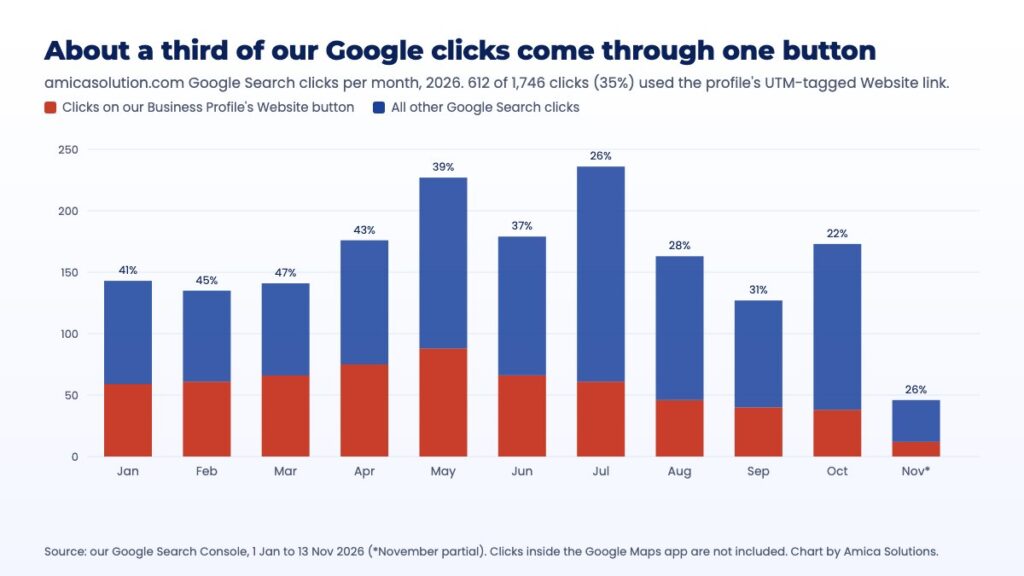
35% of our 2026 Google Search clicks came through the profile’s Website button. Source: our Google Search Console data.
From 1 January to 13 November 2026, 612 of our 1,746 Google Search clicks (35%) came through the profile’s Website button rather than an ordinary search result. In the first months of the year it was over 40%. These figures leave out taps inside the Google Maps app, which Search Console does not cover, so the real share is higher.
The searches behind those taps were mostly local, and the profile showed up higher than our web pages for several of them:
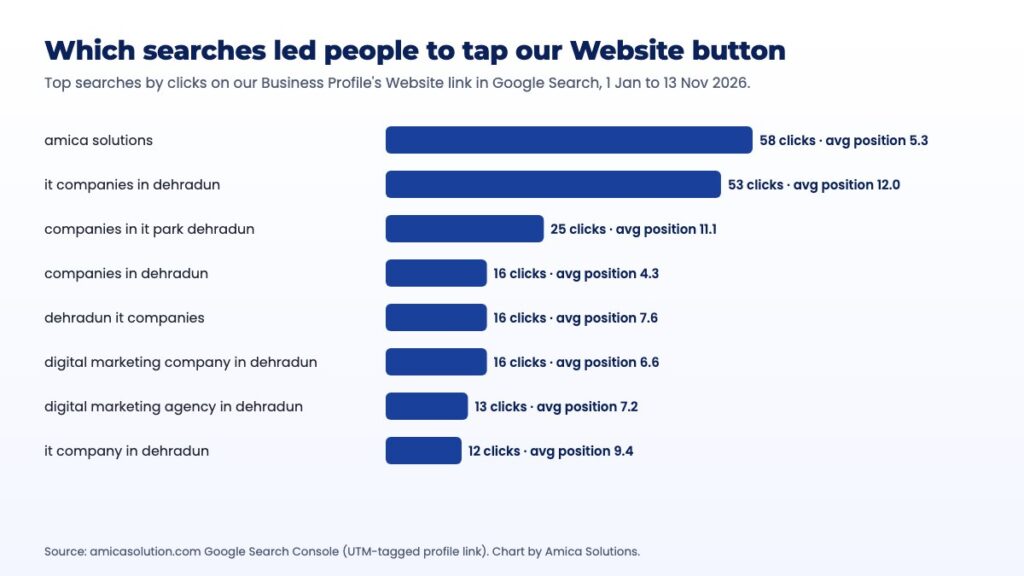
The searches that led people to tap our Website button. Source: our Google Search Console data.
For “digital marketing company in dehradun”, the profile link averaged position 6.6, while our web pages sat lower for the same search. If we had removed the Website button, or left it without tags, a third of our search clicks would have been invisible in our reports.
One more option: Google Analytics now lets you link a Business Profile to an Analytics property. It adds a Google Business Profile report with interactions, website clicks, calls, directions, messages, bookings and menu clicks, but Google says it covers only the last six months and cannot be split by individual profile. You need Editor access in Analytics and Owner or Manager access on the profile.
Do these buttons help my Google ranking?
Google has not said that any button improves ranking; their job is to turn views into enquiries. Google’s local ranking help page says local results depend mainly on relevance, distance and prominence, and it recommends complete, accurate business information. A working phone number, chat link and website are part of “complete”. Neither of Google’s help pages on booking links says those links affect ranking.
Where the buttons do matter is after the ranking. A profile at position 3 with a dead call button loses to a profile at position 5 that answers. If you want to work on the ranking itself, our guide on how to improve your Google Business Profile ranking covers it step by step.
What should I check on my profile this week?
Open your profile on a phone, as a customer would, and tap every button. This takes ten minutes and catches most problems:
- Call: does it ring a number someone answers during your listed hours? Google’s profile guidelines say the number must be under the business’s direct control.
- WhatsApp: does it open a chat with your business number, not a staff member’s personal one?
- Book online: if the button is there, does it load, and does it reach you? If you never set it up, follow the table above.
- Website: does it open your site without a redirect to a social media page, which the guidelines do not allow, and does it carry your UTM tags?
- Hours: are they your real customer-facing hours? Google asks for regular hours, and a listing that says “Open 24 hours” when nobody answers at night loses trust fast.
- Address: is it only the address? The guidelines say not to put keywords or links in the address lines.
If your profile is getting views but few taps, our post on why a Business Profile gets low views looks at the other side of the problem.
Frequently asked questions
How do I add WhatsApp to my Google Business Profile?
Go to Edit profile, then Contact, select the pencil next to Chat, choose WhatsApp and paste your click-to-chat link, such as https://wa.me/ followed by 91 and your ten-digit number. Chat is available only for verified profiles in select regions.
Why is there a Book online button on my profile that I did not add?
It may come from a booking provider linked to your business, a booking link someone added, or, according to reports from 9 November 2026, a link Google added automatically. Google has not confirmed the automatic links. Tap the button to check it works, and remove or replace it if it does not.
How do I remove a third-party booking link from Google?
You cannot delete it from your profile settings. Choose Remove provider, or use the provider’s own opt-out page or support form. Google says providers must process the request within 5 business days, after which you can report it.
Can I show both WhatsApp and text message buttons?
No. If you add both, Google shows customers only the text message option, so choose the one your team actually answers.
Do the Call or WhatsApp buttons improve my ranking on Google Maps?
Google has not said so. Local ranking depends mainly on relevance, distance and prominence. The buttons matter because they turn people who find you into calls and chats.
Sources (checked 15 November 2026)
- Google Business Profile Help: Chat with customers from your Business Profile
- Google Business Profile Help: Manage your local business links
- Google Business Profile Help: Understand your Business Profile performance
- Google Business Profile Help: Guidelines for representing your business
- Google Business Profile Help: Tips to improve your local ranking
- Google Analytics Help: Connect Google Business Profile to Google Analytics
- Google Analytics Help: Collect campaign data with custom URLs
- WhatsApp Help Center: How to use click to chat
- Search Engine Roundtable: Google adding booking links to Business Profiles (9 November 2026)
- Search Engine Roundtable: Google local panel with WhatsApp button (7 October 2026)
- Amica Solutions Google Business Profile, viewed in Google Search on a phone, 15 November 2026; amicasolution.com Google Search Console, 1 January to 13 November 2026


