
WordPress Online Exam Plugin: What a Coaching Institute Needs Beyond a Quiz Plugin (2026)
By the Amica Solutions Team · Published 16 November 2026 · Facts checked 16 November 2026. Amica Solutions builds the MCQ Test Portal, so the screenshots are from our own product and from coaching institutes that use it.
A WordPress online exam plugin for a coaching institute should do more than a quiz plugin: import questions from Word in Hindi and English, run sectional tests with a server-side timer and negative marking, show rank and analysis, sell paid series, and publish daily current affairs. The MCQ Test Portal does all of these inside your existing WordPress site.
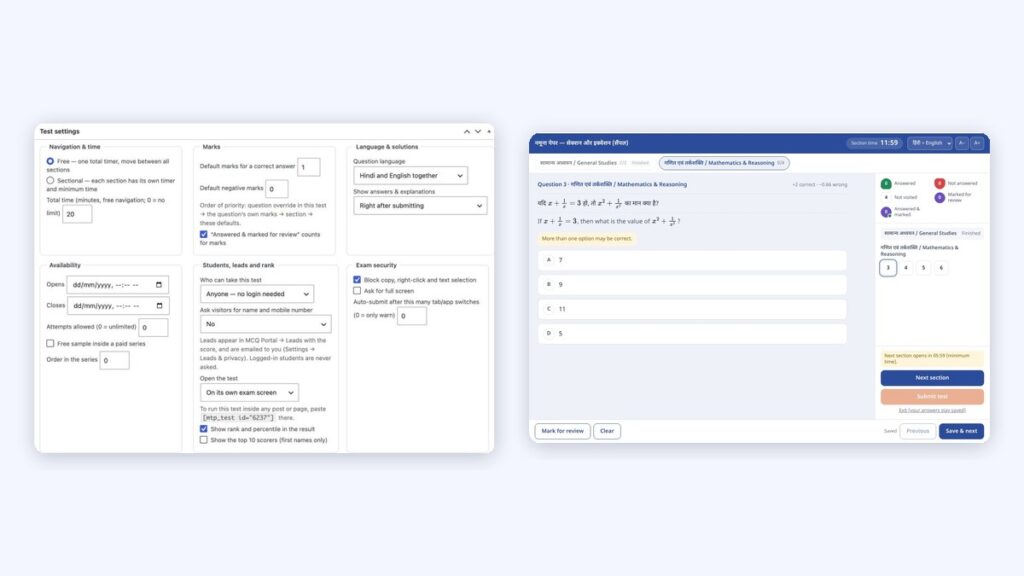
Test settings in WordPress (left) and the student’s test player (right). Screenshots: Amica Solutions
Search the WordPress plugin directory for “quiz” and you will find plenty of options for a fun personality quiz or a five-question lead magnet. A coaching institute needs something else: a real exam, with sections, a timer that cannot be cheated by refreshing the page, negative marking, ranks across hundreds of students, and Hindi alongside English.
This guide lists what to check before you install anything, and shows how the MCQ Test Portal, the plugin Amica Solutions builds, handles each point.
Key takeaways
- Quiz plugins check answers; exam plugins run fair, timed tests and rank students.
- Check eight areas: import, languages, exam settings, results, selling, current affairs, students and security.
- Needs WordPress 6.4+ and PHP 8.1+; works with Elementor and block themes.
- A server-side timer and offline-safe answers matter on phones.
- Try it on your own site with the 1-month free demo.
What is the difference between a quiz plugin and an online exam plugin?
A quiz plugin checks answers; an exam plugin runs a fair, timed test for many students and tells each one where they stand.
| Need | Typical quiz plugin | What an exam plugin must do |
|---|---|---|
| Timer | Optional countdown in the browser | Timer kept by the server, so refreshing or closing the page does not reset it |
| Sections | Rarely | Sections with their own time and minimum time |
| Marking | Score out of total | Per-question marks, negative marks, drop or bonus questions, rescore |
| Results | Score | Rank, percentile, topic-wise analysis, solutions |
| Questions | Typed one by one | Bulk import from Word, Hindi + English, equations |
| Selling | Separate plugin | Paid series with payment, coupons and access periods |
Plugins differ and change, so test any plugin against this list on a staging site before choosing.
What should you check before choosing an exam plugin?
Check eight things: question import, languages, exam settings, results, selling, current affairs, students and security. This is the Test settings box of one test in the MCQ Test Portal, showing most of them on one screen:

One test’s settings: navigation and time, marks, availability, access, rank and exam security. Screenshot: amicasolution.com admin
- Question import: can your teachers upload Word files with hundreds of questions? (bulk upload from Word)
- Languages: Hindi and English in the same question, and a language switch for students; Kruti Dev text converted (Kruti Dev to Unicode).
- Exam settings: free or sectional navigation, total time, minimum time, marks and negative marks, shuffle, attempts allowed.
- Results: rank, percentile, solutions, topic-wise strengths, and a class analysis for teachers.
- Selling: free, paid and practice series, payments, coupons, access periods (how to sell test series online).
- Current affairs: daily sets, notes, monthly tests, state-wise and exam-wise pages.
- Students: accounts, OTP login, My Tests progress, privacy consent.
- Security: copy and right-click blocking, full screen, an automatic submit after too many tab switches.
What does the plugin need from your WordPress site?
WordPress 6.4 or newer and PHP 8.1 or newer, with “Post name” permalinks. No extra server software is needed.
| Requirement | Detail |
|---|---|
| WordPress / PHP | 6.4+ / 8.1+ |
| Permalinks | Settings → Permalinks → Post name |
| Theme | Classic themes such as Hello Elementor, and block themes; templates can be copied into your theme |
| Fonts and equations | Fonts load from your own site; equations are saved as images |
| PDFs | PDF library bundled, loaded only when a PDF is made |
| Background jobs | A real server cron job keeps auto-submit, PDFs and messages on time |
| Mobile app later | REST API at /wp-json/mtp/v1/ |

Settings → General: language, local fonts and colours. Screenshot: amicasolution.com admin
How does it behave on slow phones and bad networks?
Students take tests on cheap phones and patchy mobile data, so the player must be light and forgiving. Answers are kept on the phone and sent when the connection returns, the timer runs on the server, and open tests are submitted automatically when time ends. Since version 1.4.3, test and result pages are sent past speed plugins that delay scripts (WP Meteor, Rocket Loader and others), so a “Loading your test” screen does not get stuck.

The test player: section timer, palette, Hindi + English. Screenshot: MCQ Test Portal
How is the plugin licensed and supported?
Each website gets a licence key from Amica Solutions, checked twice a day. If a licence ends, the portal pauses and nothing is deleted. If you do not have a technical team, Amica Solutions can help with installation and the first import. Two institutes run it today: Shri RAJ IAS and Inspiration Study Circle, both for daily current affairs in Hindi and English.
How can you try it before installing?
Send us one of your Word files. We switch the portal on for your website for a month and build your first test from it.
- MCQ Test Portal: features and guides
- Getting started (installation)
- How to create an online test series website
- Take the demo test
Get the 1-month free demo on WhatsAppTake the live demo test
How does the portal handle maths equations?
Equations come straight from your Word file and reach students as sharp images, in Hindi and English, with no maths software needed on their phones.
- From Word: equations made with Word’s Insert → Equation, or LaTeX typed between
$…$(or$$…$$on its own line), are read during the upload. - Drawn once, saved as images: the equation is drawn in your browser while you import and saved on your site as an SVG image plus a PNG copy. Students load a small image, so fractions, powers and matrices look the same on every phone.
- Spoken alt text in two languages: each equation carries a description, for example “A equals the 2 by 2 matrix Row 1: 1 2 Row 2: 3 4” and “ए बराबर 2 बाय 2 आव्यूह पंक्ति 1: 1 2 पंक्ति 2: 3 4”, from our demo test.
- Edit by hand: the question editor has a visual equation editor and a LaTeX box.
- In PDFs too: downloadable PDFs keep the equations.
- MathType: MathType equations come in as pictures; convert them in Word (MathType → Convert Equations) for sharp results.
Our Class 12 Maths demo was made from one Word file: 10 questions, 126 equations, no errors in the preview. Open it on your phone to see how it looks:

Equations in our demo test on a phone: fractions, powers and a matrix, in Hindi and English. Screenshot: amicasolution.com
Frequently asked questions
Is there a WordPress plugin for online exams with negative marking?
Yes. The MCQ Test Portal supports per-question marks and negative marks, set in the Word file, per section, per test or as a site default, and can rescore every attempt if marks change.
Can a WordPress exam plugin handle Hindi?
The MCQ Test Portal shows Hindi and English in the same question, lets students switch the interface to हिंदी, and converts Kruti Dev text during Word import.
Does the timer keep running if a student closes the browser?
Yes. The timer is kept by the server, and a test left open is submitted automatically when its time ends.
What does the plugin need to run?
WordPress 6.4 or newer, PHP 8.1 or newer, Post name permalinks and, ideally, a real server cron job.
Is there a free trial?
Yes. Amica Solutions offers a 1-month free demo of the MCQ Test Portal on your own website. Message +91 94113 39575 on WhatsApp.
Sources (checked 16 November 2026)
- MCQ Test Portal: product page and guides
- MCQ Test Portal: licence, FAQ and version history
- MCQ Test Portal 1.9.0 settings screens on amicasolution.com, 16 November 2026


