How to Set Up a Sectional Timer Mock Test (Each Section With Its Own Time) for Your Students (2026)
By the Amica Solutions Team · Published 16 November 2026 · Facts checked 16 November 2026. Amica Solutions builds the MCQ Test Portal, so the screenshots are from our own product and from coaching institutes that use it.
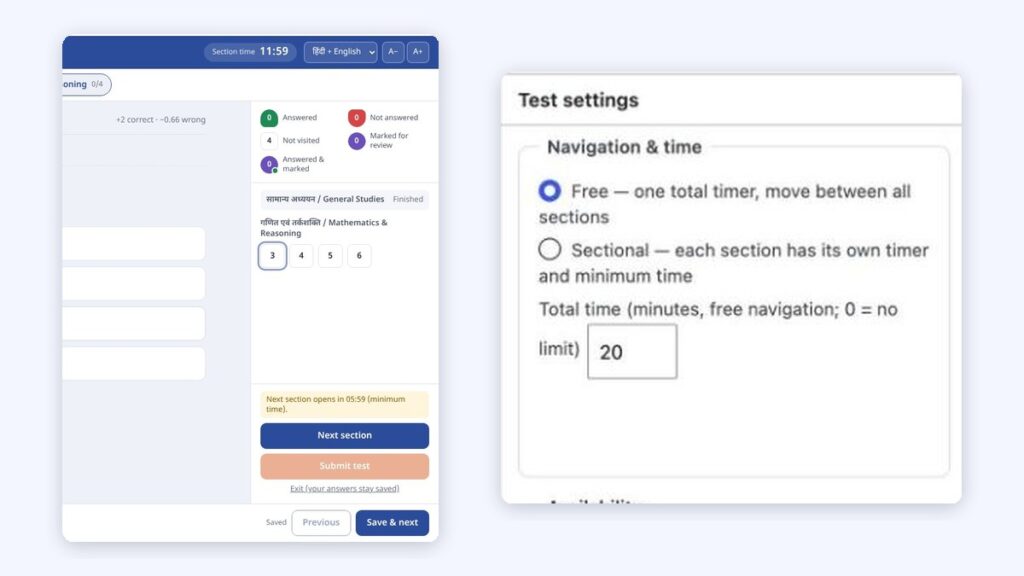
To run a sectional timer mock test, give each section its own Time (and optional Minimum Time) in the Word file, upload it, and set the test’s navigation to “Sectional”. Students then answer one section at a time against its own clock, cannot return to a finished section, and get a section-wise result.
The section timer in the player (left) and the navigation setting (right). Screenshots: Amica Solutions
A student can be brilliant in General Studies and still fail a paper because Reasoning ate the last twenty minutes. When an exam gives each section its own time, the only way to prepare is to practise exactly that way: the section opens, the clock runs, and when it ends you move on whether you are ready or not.
This guide shows how to set up that kind of mock test, with screens from the MCQ Test Portal. Check your target exam’s latest official notice for its actual section times.
Key takeaways
Free navigation = one timer; sectional navigation = a timer per section, forward only.
Set Time and Minimum Time per section in the Word file.
The server keeps the timer, so refreshing does not reset it.
Results show section-wise analysis.
Try it on your own site with the 1-month free demo.
What is the difference between a sectional timer and one total timer?
There are two ways to run time in a test: one timer for the whole paper, or a separate timer for each section.
Free navigation
Sectional navigation
Timer
One total timer
Each section has its own timer
Moving between sections
Any time, back and forth
Forward only; a finished section cannot be reopened
Minimum time
Not used
Optional: the next section opens only after a minimum time
Good for
Papers with one overall time limit
Exams that time each section separately
How do you set up a sectional timer test?
In the Word file, start each section with a small “Section” table; in the test settings, choose “Sectional”.
Add a Section table before each group of questions, with rows such as Section (the name), Time, Minimum Time, Instructions, Marks and Negative Marks. Shuffle Questions and Shuffle Options can be set per section too.
Upload the file in Import from Word. The preview lists each section with its question count, time and minimum time.
In the test’s Test settings → Navigation & time, choose Sectional.
Publish, then take the test yourself once before sharing it.
The import preview lists sections with time and minimum time. Screenshot: MCQ Test Portal
Sections can also be built or changed in WordPress: add a section, tick questions and move them, set marks and shuffling for each section.
Sections in the test builder: marks, shuffle and per-question settings. Screenshot: amicasolution.com admin
What does the student see during a sectional test?
The student sees the current section’s time, the section tabs, and a message when the next section will open. In this real screen the section timer reads 11:59, the first section is marked “Finished”, and the panel says “Next section opens in 05:59 (minimum time)”:
The player: section timer 11:59 and “Next section opens in 05:59 (minimum time)”. Screenshot: MCQ Test Portal
Answers are saved as the student goes, the timer is kept by the server so refreshing does not reset it, and when time ends the section closes (or the test is submitted). The result then shows a section-wise analysis, so the student can see which section cost them marks.
Which settings make a sectional mock feel like the real exam?
Set the times your target exam uses, keep a realistic minimum time, and mix sectional and free tests through the course.
Setting
Suggestion
Section time
Copy the latest official pattern of the exam you prepare for
Minimum time
Use it to stop students rushing a section; leave it empty if the exam allows moving on early
Negative marks
Match the exam, per section if it differs
Shuffle
Shuffle questions and options per section for repeated attempts; “All of the above” type options never move
Attempts
Limit attempts for graded mocks; leave unlimited for practice
Can current affairs tests run alongside sectional mocks?
Yes. Daily current affairs sets and the automatic monthly current affairs test sit next to your sectional mocks in the same portal, with state-wise and exam-wise pages from the same upload. Shri RAJ IAS and Inspiration Study Circle publish their daily sets this way.
How can you try it?
Send us one of your Word files. We switch the portal on for your website for a month and build your first test from it.
Equations come straight from your Word file and reach students as sharp images, in Hindi and English, with no maths software needed on their phones.
From Word: equations made with Word’s Insert → Equation, or LaTeX typed between $…$ (or $$…$$ on its own line), are read during the upload.
Drawn once, saved as images: the equation is drawn in your browser while you import and saved on your site as an SVG image plus a PNG copy. Students load a small image, so fractions, powers and matrices look the same on every phone.
Spoken alt text in two languages: each equation carries a description, for example “A equals the 2 by 2 matrix Row 1: 1 2 Row 2: 3 4” and “ए बराबर 2 बाय 2 आव्यूह पंक्ति 1: 1 2 पंक्ति 2: 3 4”, from our demo test.
Edit by hand: the question editor has a visual equation editor and a LaTeX box.
In PDFs too: downloadable PDFs keep the equations.
MathType: MathType equations come in as pictures; convert them in Word (MathType → Convert Equations) for sharp results.
Our Class 12 Maths demo was made from one Word file: 10 questions, 126 equations, no errors in the preview. Open it on your phone to see how it looks:
Equations in our demo test on a phone: fractions, powers and a matrix, in Hindi and English. Screenshot: amicasolution.com
Frequently asked questions
What is a sectional timer mock test?
A mock test in which each section has its own time limit. When a section’s time ends, the student moves to the next section and cannot go back.
How do I create a sectional timed test?
Add a Section table with Time (and optionally Minimum Time) before each group of questions in your Word file, upload it, and set Navigation to Sectional in the test settings.
Can students go back to a finished section?
Not in sectional navigation. With free navigation and one total timer, they can move between sections freely.
Does the timer reset if the student refreshes the page?
No. The timer is kept by the server, and a test left open is submitted automatically when its time ends.
Is there a free trial?
Yes. Amica Solutions offers a 1-month free demo of the MCQ Test Portal on your own website. Message +91 94113 39575 on WhatsApp.