
How to Create a Pillar Page & Content Hub for Topical Authority
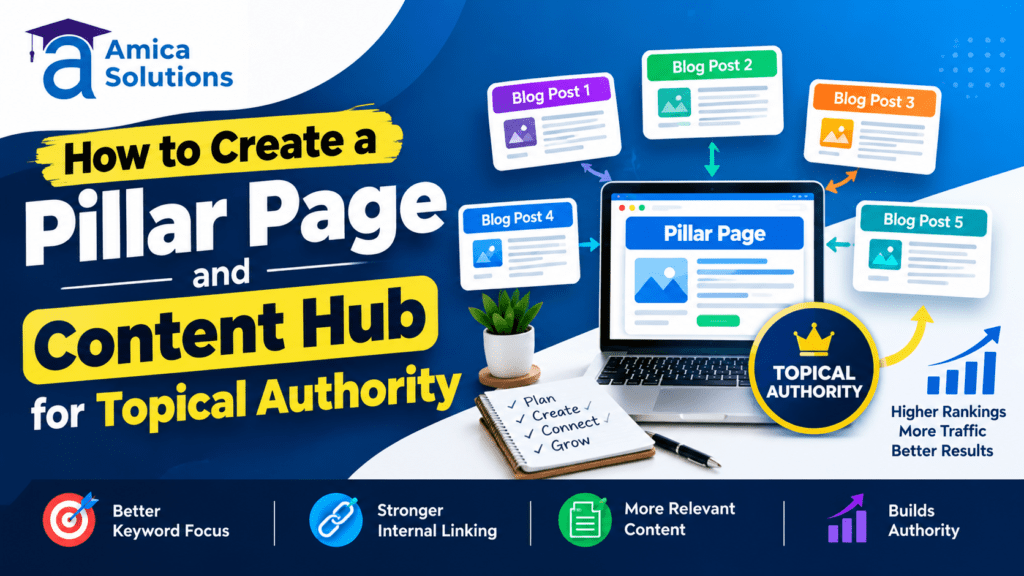
What Is a Pillar Page?
A pillar page is a comprehensive, cornerstone piece of content that covers a broad topic in depth. Unlike traditional blog posts, a pillar page serves as the authoritative hub for an entire topic cluster. It functions as the central resource that links to and supports multiple related subtopics, establishing your website’s expertise and credibility on a subject.
In today’s evolving digital landscape, creating a pillar page has become essential for businesses looking to establish topical authority. Whether you’re managing content for digital marketing agencies like Amica Solution, which specializes in SEO services in Dehradun, or any other industry, pillar pages provide the foundational structure for successful content strategy.
A pillar page typically ranges from 2,500 to 5,000+ words and covers the main aspects of a topic while linking to detailed subtopic content. For instance, Amica Solution could create a pillar page on “Digital Marketing Strategies” that covers SEO, content marketing, social media marketing, and email marketing—each with supporting cluster content.
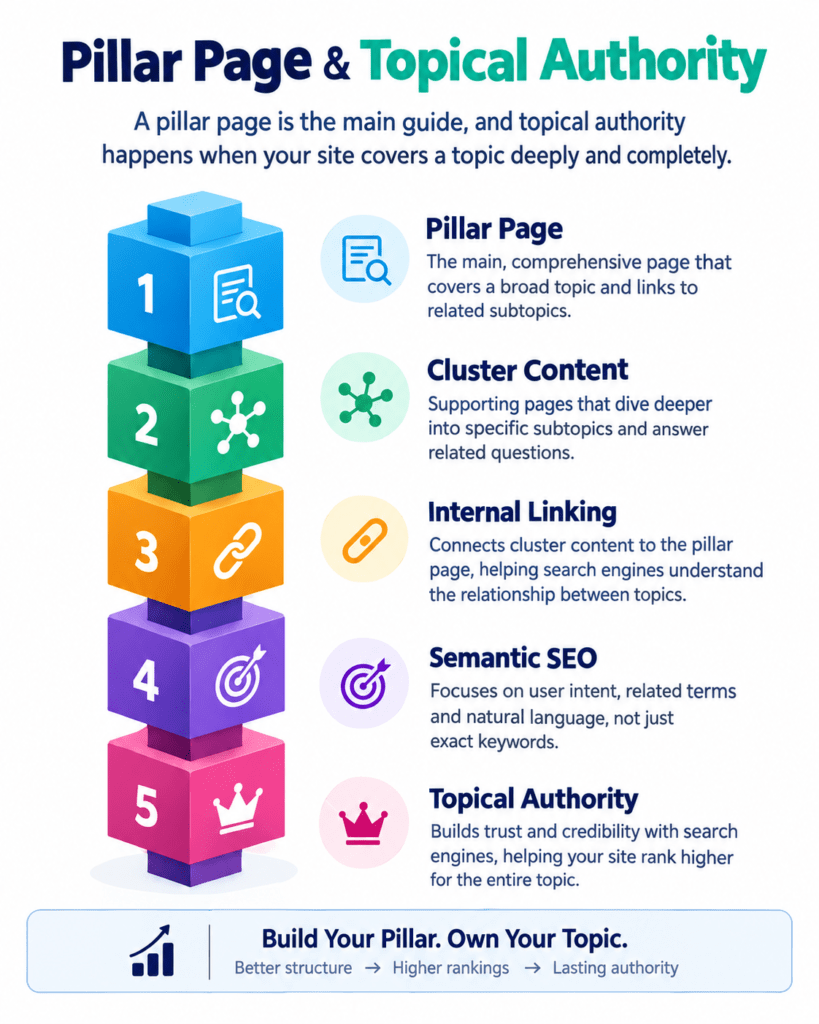
What Is a Content Hub?
A content hub is the complete ecosystem built around a pillar page. It consists of the pillar page itself plus multiple supporting content pieces (cluster content) that explore individual subtopics in detail. These cluster pages link back to the pillar page, creating an interconnected web of related content.
The content hub approach is particularly beneficial for businesses in Dehradun seeking to enhance their online visibility. By organizing content into hubs, companies can demonstrate expertise across multiple related topics while improving internal link structures that boost SEO performance.
A typical content hub includes:
- One pillar page (main resource)
- 10-15+ cluster content pieces (supporting articles)
- Internal linking structure connecting all pieces
- Topic-related resources and tools
What Is Topical Authority in SEO?
Topical authority refers to a website’s demonstrated expertise and credibility on a specific subject matter. Search engines like Google recognize topical authority by analyzing the depth and breadth of content across a website on related topics. Websites with strong topical authority rank higher in search results because they appear more trustworthy and comprehensive.
Building topical authority requires creating interconnected, well-researched content that covers all angles of a subject. This is where pillar pages and content hubs become invaluable. By establishing topical authority, businesses—especially those offering services like digital marketing and SEO optimization in Dehradun—can improve their organic visibility and attract qualified leads.
The benefits of topical authority include:
- Improved search rankings
- Higher click-through rates (CTR)
- Increased domain authority
- Better user engagement
- Reduced bounce rates
Pillar Page vs Content Hub: Key Differences
| Aspect | Pillar Page | Content Hub |
|---|---|---|
| Purpose | Comprehensive overview of main topic | Complete content ecosystem |
| Word Count | 2,500-5,000+ words | Varies (1,000-3,000 per piece) |
| Scope | Broad topic coverage | Deep-dive into subtopics |
| Structure | Single, linked document | Multiple interconnected pages |
| Internal Links | Links to cluster content | All link back to pillar |
| User Journey | Entry point for topic exploration | Detailed resource exploration |
| SEO Impact | Establishes topical authority | Improves keyword rankings |
The key difference is that a pillar page is a single comprehensive document, while a content hub encompasses the entire content ecosystem. Together, they create a powerful SEO strategy for businesses.
How Pillar Pages Support Topical Authority
Pillar pages are instrumental in building topical authority because they serve as the authoritative reference point on a subject. When search engines crawl your site, they recognize the pillar page as the primary resource for a topic, and the cluster content as supporting evidence of expertise.
For digital marketing agencies and service providers in Dehradun, establishing topical authority through pillar pages can significantly improve visibility for competitive search terms. When Amica Solution creates content on pillar pages covering digital marketing services, it signals to Google that the company is an authority in that space.
The relationship between pillar pages and topical authority works as follows:
- Centralization: The pillar page centralizes all information on a topic
- Coverage: Cluster content provides comprehensive topic coverage
- Validation: Multiple supporting pieces validate expertise
- Trust: Search engines trust sites with demonstrated authority
- Ranking: Strong topical authority leads to better rankings
How to Choose a Core Topic for Your Pillar Page
Selecting the right core topic is crucial for pillar page success. Your core topic should be broad enough to support 10-15+ cluster content pieces but specific enough to maintain relevance.
Steps to choose your core topic:
- Conduct Keyword Research: Use tools like Semrush, Ahrefs, or Moz to identify high-volume, relevant keywords
- Analyze Competitor Content: Study how competitors structure their pillar pages
- Consider User Intent: Understand what information your audience seeks
- Evaluate Business Alignment: Ensure the topic relates to your services
- Assess Subtopic Potential: Confirm you can create 10-15 related cluster pieces
For Amica Solution, potential pillar page topics could include “Complete Guide to Digital Marketing in Dehradun” or “Web Development Services: From Planning to Launch.” These topics are broad enough to support multiple cluster articles while remaining focused on the company’s core services.
How to Research Supporting Topics for a Content Hub
Once you’ve selected your pillar page topic, research supporting subtopics that will form your content hub. These subtopics should be related but distinct enough to warrant separate content pieces.
Research strategies include:
- Keyword Clustering: Group related keywords into topic clusters
- Competitive Analysis: Identify what competitors cover
- User Queries: Analyze actual search queries in your industry
- Topic Modeling: Use SEO tools to discover topic relationships
- Audience Research: Conduct surveys and interviews with your target audience
For a pillar page on “Digital Marketing Strategies,” supporting topics might include:
- SEO best practices
- Social media marketing tactics
- Content marketing frameworks
- Email marketing automation
- Paid advertising strategies
How to Map Keywords and Search Intent to Each Topic
Mapping keywords to your pillar page and cluster content ensures every piece targets the right search queries with the right content. Search intent—whether users want information, want to navigate somewhere, or intend to purchase—should guide your keyword assignment.
Keyword mapping process:
- Identify Primary Keyword: For your pillar page (highest volume, broadest intent)
- Find Secondary Keywords: For each cluster article (medium volume, more specific)
- Discover Long-tail Keywords: For supporting content (lower volume, specific intent)
- Match Intent to Content: Align keyword intent with content type
- Create Keyword Map: Document keyword assignment for each piece
Example for Amica Solution—Digital Marketing pillar page:
- Pillar: “Digital marketing strategies” (broad informational intent)
- Cluster 1: “SEO optimization techniques” (how-to intent)
- Cluster 2: “Social media marketing tips” (informational intent)
- Cluster 3: “Email marketing best practices” (how-to intent)
How to Structure Your Pillar Page
A well-structured pillar page guides readers through complex information while supporting SEO. Here’s the recommended structure:
Pillar Page Structure:
- Compelling Headline: Include your focus keyword naturally
- Executive Summary: Brief overview of what readers will learn
- Table of Contents: Help readers navigate and assist SEO
- Introduction Section: Establish context and expertise
- Main Content Sections: Broad topic coverage with subsections
- Cluster Content Links: Strategic internal links to related articles
- Key Takeaways Box: Highlight main points for scanning
- CTA Section: Drive engagement or conversions
- FAQ Section: Address common questions
- Conclusion: Summarize and reinforce topical authority
For services like those offered by Amica Solution—web development, digital marketing, and graphic design—each section should briefly introduce topics before linking to detailed cluster content.
How to Build Supporting Content Around the Pillar Page
Cluster content provides the depth that makes your pillar page valuable. Each cluster article should explore one subtopic in detail while clearly connecting to your pillar page.
Cluster content guidelines:
- Target Specific Keywords: Each cluster article targets one or more related keywords
- Maintain Consistency: Use consistent terminology and style
- Provide Value: Offer actionable, detailed information
- Keep Articles Focused: Avoid covering too many topics in one piece
- Word Count: Typically 1,500-3,000 words per cluster article
- Authority Building: Cite sources, include case studies, provide data
Amica Solution could create cluster content such as:
- “How Web Development Impacts Your SEO Ranking”
- “Graphic Design Trends for Digital Marketing in 2024”
- “Google My Business Optimization Strategies”
Creating an Internal Linking Structure Between Hub and Supporting Pages
Internal linking is the connective tissue of your content hub. It helps users navigate between related content while distributing page authority throughout your site.
Internal linking best practices:
| Linking Strategy | Description | Best For |
|---|---|---|
| Contextual Links | Links within article text | Natural, helpful linking |
| Cluster Links | All cluster articles link to pillar | Establishing hierarchy |
| Hub Navigation | Pillar links to all clusters | Guiding user journey |
| Sibling Links | Related cluster articles link to each other | Comprehensive coverage |
| Breadcrumb Navigation | Visual navigation path | User experience |
When linking from cluster content to your pillar page, use descriptive anchor text like “learn more about how to create a pillar page and content hub for topical authority” rather than generic “click here” text.
How to Avoid Keyword Cannibalization in a Content Hub
Keyword cannibalization occurs when multiple pages target the same keyword, confusing search engines about which page to rank. This can damage your SEO performance.
Cannibalization prevention strategies:
- Clear Keyword Assignment: Each piece targets unique keywords
- Keyword Hierarchy: Pillar page gets primary keywords; clusters get modifiers
- Differentiate Intent: Ensure each piece serves different user intents
- Internal Linking Strategy: Link strategically, not excessively
- Monitor Search Console: Track keyword performance and ranking pages
- Merge or Redirect: Consolidate overlapping content when necessary
For Amica Solution’s content, ensure that separate articles on “digital marketing services in Dehradun” and “SEO services in Dehradun” don’t compete for the exact same keywords—instead, one might target “digital marketing agency Dehradun” while the other targets “SEO company in Dehradun.”
How to Optimize Pillar Pages for Semantic SEO
Semantic SEO involves optimizing content for meaning and context, not just keywords. Search engines increasingly understand language semantically, making this optimization crucial.
Semantic SEO optimization techniques:
- Natural Language: Write naturally, avoiding keyword stuffing
- Synonym Variation: Use related terms and synonyms throughout
- Contextual Content: Provide context for specialized terms
- Entity Optimization: Mention related entities and concepts
- Schema Markup: Use structured data for better indexing
- Related Questions: Include FAQ sections addressing related queries
- Long-form Content: Comprehensive content supports semantic understanding
How to Keep Your Content Hub Updated
Content hubs aren’t set-and-forget assets. Regular updates signal freshness to search engines and keep content relevant.
Content hub maintenance checklist:
- Quarterly Reviews: Audit performance and relevance
- Monthly Updates: Refresh statistics, add new information
- Link Audits: Fix broken links, refresh outdated resources
- Expand Content: Add new cluster articles on emerging subtopics
- Update CTAs: Ensure calls-to-action remain current
- Refresh Design: Keep visual elements modern and accessible
- Monitor Analytics: Track performance metrics and adjust strategy
How to Measure the Performance of a Pillar Page and Content Hub
Measurement determines whether your pillar page and content hub strategy is working. Track multiple metrics to assess success.
Key performance metrics:
| Metric | Purpose | Target |
|---|---|---|
| Organic Traffic | Overall visibility | Increasing monthly |
| Keyword Rankings | Ranking positions | Top 10 for main keyword |
| Engagement Rate | User interest | >2 minutes average |
| Conversion Rate | Business results | Industry average+ |
| Backlinks | Authority building | Growing monthly |
| Internal Link Clicks | Navigation effectiveness | 20%+ of interactions |
| Bounce Rate | Content relevance | <60% |
Tools like Google Analytics, Search Console, Semrush, and Ahrefs help track these metrics effectively.
Common Pillar Page and Content Hub Mistakes to Avoid
Learning from common mistakes accelerates your success with pillar pages.
Mistakes to avoid:
- Weak Core Topic: Too broad or narrow, limiting expansion potential
- Poor Linking Strategy: Inconsistent or excessive internal linking
- Neglecting User Experience: Complex navigation or poor readability
- Keyword Cannibalization: Multiple pages targeting identical keywords
- Outdated Content: Failing to refresh aging information
- Inadequate Research: Shallow content lacking depth and authority
- Missing CTAs: Forgetting to guide users toward actions
- No Performance Tracking: Launching without measurement systems
- Inconsistent Publishing: Irregular content updates reducing visibility
- Ignoring Mobile: Unoptimized mobile experience harming rankings
Conclusion
Creating a pillar page and content hub for topical authority represents a strategic investment in your website’s SEO performance. By implementing the strategies outlined in this guide, you can establish your website as an authoritative resource in your industry.
For businesses in Dehradun looking to enhance their digital presence, this approach aligns perfectly with comprehensive digital marketing strategies. Companies like Amica Solution, which specializes in SEO, content marketing, and web development services, understand the importance of building topical authority through well-structured content hubs.
The pillar page and content hub methodology provides:
- Improved Rankings: Through topical authority and semantic SEO
- Better User Experience: Through organized, interconnected content
- Increased Conversions: Through clear calls-to-action and targeted messaging
- Long-term Authority: Through comprehensive topic coverage
- Sustainable Growth: Through evergreen content strategies
Start implementing your pillar page strategy today, and watch your organic visibility, authority, and conversions grow. Remember: building topical authority is a marathon, not a sprint—consistent effort and quality content are your greatest assets.
Call us at +91 9411339575
or visit amicasolution.com to book a free consultation.
Visit us at – Amica Solutions Pvt. Ltd
Frequently Asked Questions
1. What is a pillar page, and why is it important for SEO?
A pillar page is a comprehensive resource that covers a broad topic in detail and serves as the central page of a content cluster. It provides an overview of the main subject while linking to more specific supporting articles that explain individual subtopics in greater depth. For example, a pillar page about “SEO” could link to supporting content about keyword research, technical SEO, link building, on-page SEO, and local SEO. This structure helps users navigate related information easily and creates a clear relationship between your website’s pages. A well-planned pillar page can also strengthen internal linking, improve content organization, and help search engines understand the overall subject coverage of your website.
2. What is a content hub, and how is it different from a pillar page?
A content hub is a collection of interconnected content pages organized around a central topic, while a pillar page is usually the main, broad resource within that structure. The pillar page provides a high-level overview of the subject, whereas supporting pages focus on specific questions, subtopics, or search intents. For example, a “Content Marketing” pillar page might connect to articles covering content strategy, content calendars, SEO content writing, content distribution, and content measurement. Together, these pages form a content hub. Therefore, a pillar page can be considered the central part of a larger content hub rather than a replacement for the entire hub.
3. How do you create a pillar page and content hub for topical authority?
Start by choosing a broad topic that is highly relevant to your website, products, or services. Next, research the important subtopics, related questions, keywords, and search intents associated with that subject. Create the pillar page to provide a comprehensive overview of the main topic, then develop supporting articles that address specific subtopics in greater detail. Connect the pillar page to the supporting articles using relevant internal links, and link appropriate supporting articles to one another where useful. Keep the information accurate, useful, and non-repetitive. As your content hub grows, regularly review existing pages, update outdated information, fix broken links, and identify important topic gaps.
4. How does a content hub help build topical authority?
A content hub helps demonstrate comprehensive coverage of a subject by organizing multiple related pages around a central theme. Instead of publishing unrelated articles, the website develops a connected collection of resources that addresses different aspects of the same topic. Internal links help establish relationships between the pages and make it easier for visitors to move from broad information to more specific resources. Comprehensive topic coverage can contribute to stronger topical relevance, although creating a content hub does not guarantee higher rankings. The quality, usefulness, originality, search intent alignment, internal linking, and overall authority of the website also matter.
5. How many articles should be included in a pillar page content hub?
There is no universal number of supporting articles required for a successful content hub. The appropriate size depends on how broad and complex the main topic is and how many meaningful subtopics and search intents exist. A focused topic may require only a few high-quality supporting pages, while a broad subject may naturally require dozens of resources. The goal should be comprehensive and useful coverage rather than publishing a specific number of articles. Before creating new content, analyze whether the subtopic provides unique value and whether it addresses a distinct user need. Avoid creating multiple pages that target the same search intent because this can create unnecessary content overlap and make your site structure harder to manage.
What is the 7 times rule in marketing?
A potential patient typically needs to encounter your clinic or brand around 7 times before they take action. This is why multi-channel, consistent digital marketing outperforms one-off campaigns. Each platform — Google, Instagram, GBP, your website — is one more touchpoint in that journey.
Contact Us
Recent Posts





Written and reviewed by
Amica Solutions Team
Amica Solutions is a digital marketing company in Dehradun working on SEO, Google Business Profile management, Google Ads, social media marketing, content marketing, website development, and lead generation for local businesses.
- Office: Laxmi Tower, Near Sahastradhara Road, B Block, Aman Vihar, Dehradun, Uttarakhand 248001
- Phone: +91 9411339575
- Email: contact@amicasolution.com