Maths Equations in Online Tests: How to Put Fractions, Matrices and Integrals in Hindi + English MCQs (2026)
By the Amica Solutions Team · Published 16 November 2026 · Facts checked 16 November 2026. Amica Solutions builds the MCQ Test Portal, so the screenshots are from our own product and from coaching institutes that use it.
Write equations in Word (Insert → Equation) or as LaTeX between $ signs, and upload the file. The MCQ Test Portal draws each equation once as a sharp SVG image with a PNG copy, adds spoken alt text in Hindi and English, shows it the same on every phone, and keeps it in downloadable PDFs. MathType equations should be converted in Word first.
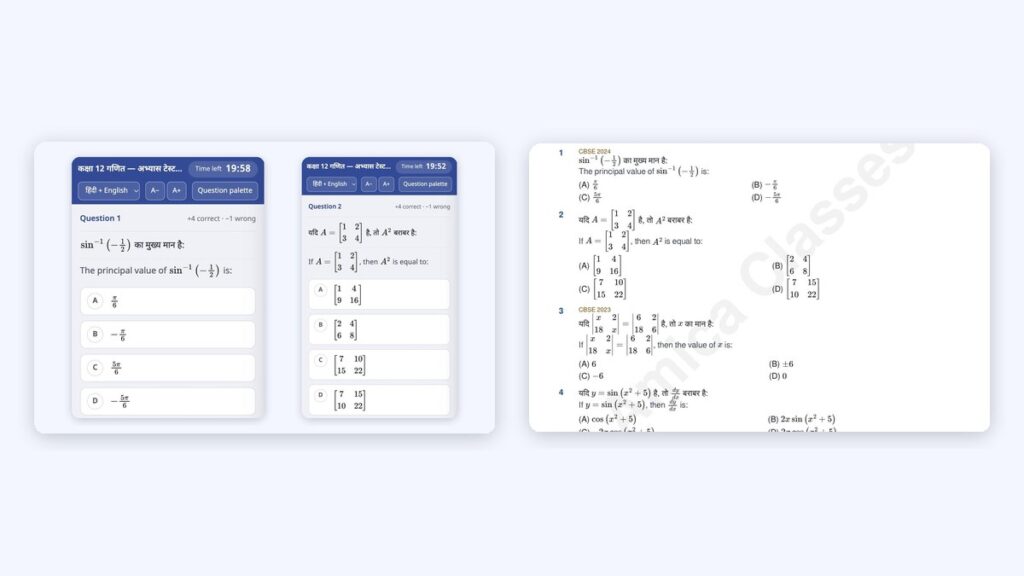
Equations on a phone (left) and in the PDF (right). Screenshots: MCQ Test Portal demo
Ask any maths or physics teacher who has tried an online quiz tool. The equations are the problem. Fractions turn into “1/2”, matrices into a row of numbers, and the “fix” is a blurry screenshot of each question that nobody can edit later.
We built equation handling into the MCQ Test Portal from the first release, because our own clients teach Class 12 Maths and Physics. This is exactly how it works, with our Class 12 Maths demo test as the example: 10 questions and 126 equations from one Word file.
Key takeaways
Word equations and LaTeX both work.
Saved as SVG + PNG: sharp and fast on phones.
Alt text in Hindi and English.
Equations print in PDFs.
Convert MathType first.
Try it on your own site with the 1-month free demo.
How do equations get into an online test?
Two ways in: Word’s own equation tool, or LaTeX between dollar signs.
Method
How to write it
Good for
Word equation
Insert → Equation in Word, as teachers already do
Existing question papers
LaTeX inline
$\frac{dy}{dx}$ inside a sentence
Teachers who type LaTeX
LaTeX display
$$\int_0^{\pi/2} \cos x\,dx$$ on its own line
Big integrals and matrices
MathType
Comes in as a picture; convert in Word (MathType → Convert Equations) first
Old files made with MathType
Question editor
Visual equation editor plus a LaTeX box
Fixing or adding one question
Equations work everywhere in a question: in the question, in each option, and in the solution, in both Hindi and English.
Why do equations look sharp on every phone?
Each equation is drawn once, in your own browser while you import, and saved on your site as a sharp SVG image with a PNG copy. Nothing needs installing on the server: the drawing tools (MathJax and the Speech Rule Engine) come inside the plugin. Students then load small images, so a matrix looks the same on a ₹7,000 phone as on a laptop, and the page stays fast.
What alt text do equations get?
Every equation carries a spoken description in Hindi and English, used as its alt text. From our demo test:
Screen readers read it aloud for students who cannot see the screen, and search engines get words instead of an unnamed picture.
What do students and teachers see?
Here is what students see on a phone, and what the teacher sees in the editor. The phone shows a sin−1 question with fractions and a matrix question, in Hindi and English:
Our demo on phones: sin⁻¹ with fractions, and a matrix question. Screenshot: amicasolution.com
The question editor: Hindi and English fields with a matrix equation and equation buttons. Screenshot: amicasolution.com admin
In the editor the equation shows as LaTeX, so a wrong sign is a one-character fix. Every change is kept in the question’s version history.
In the test builder, each question shows its LaTeX source. Screenshot: amicasolution.com admin
Do equations print in PDFs?
Downloadable PDFs keep the equations, in both languages. This is page 1 of the same demo test as a PDF, with matrices, determinants and integrals printed cleanly:
The same demo test as a PDF. Sample PDF: MCQ Test Portal
A few habits make the import clean the first time.
Do
Avoid
Use Insert → Equation or LaTeX
Pasting screenshots of equations
Convert MathType equations in Word first
Uploading MathType objects as they are (they become pictures)
Check the import preview for warnings
Skipping the preview
Use .docx
Old .doc files, or WMF/EMF pictures (skipped)
Current affairs rarely needs equations, but economy questions with percentages and growth rates work the same way, inside the same daily upload that builds your state-wise and exam-wise pages. The full Word format is in how to bulk upload MCQs from Word.
How can you try it?
Send us one Word file full of equations. We switch the portal on for your website for a month and build your first test from it.
How do I add maths equations to an online MCQ test?
Write them in Word with Insert → Equation, or as LaTeX between $ signs, and upload the .docx file. The portal turns each equation into a sharp image with alt text.
Do equations work in Hindi questions?
Yes. Equations work in Hindi and English questions, options and solutions, with alt text in both languages.
What about MathType equations?
MathType equations come in as pictures. Convert them in Word first (MathType → Convert Equations) for sharp results.
Do equations print in the PDF?
Yes. Question paper PDFs keep the equations, including matrices, fractions and integrals.
Is there a free trial?
Yes. Amica Solutions offers a 1-month free demo of the MCQ Test Portal on your own website. Message +91 94113 39575 on WhatsApp.