Upload Current Affairs Notes From Word and Give Students a PDF: Daily, Monthly and Yearly (2026)
By the Amica Solutions Team · Published 16 November 2026 · Facts checked 16 November 2026. Amica Solutions builds the MCQ Test Portal, so the screenshots are from our own product and from coaching institutes that use it.
Write each note under a Heading 1 title in Word, add optional Topic, Exam or State lines, and upload the file in the MCQ Test Portal. Each note gets its own article page, the day page shows the MCQs and the full notes, and daily, monthly and yearly Notes PDFs are made automatically.
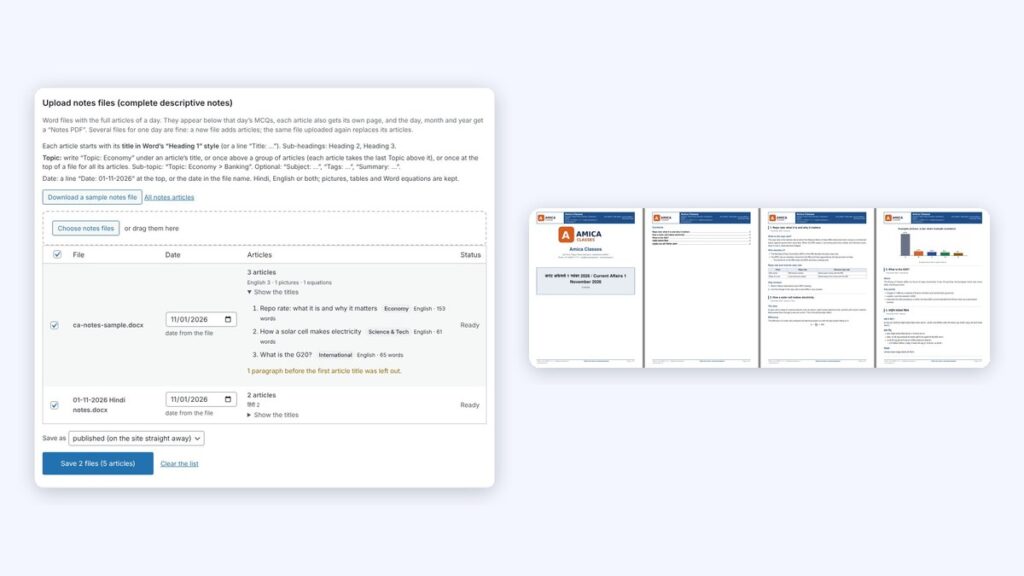
Uploading notes (left) and the Notes PDF (right). Screenshots: MCQ Test Portal
Most coaching institutes already have the hard part: a faculty member who writes good current affairs notes every day, usually in Word. What happens next is often a PDF in a Telegram group, with no page on the website and nothing Google can find.
In the MCQ Test Portal the same Word file becomes web pages and PDFs. Shri RAJ IAS publishes its daily notes this way.
Key takeaways
One Heading 1 per article; optional Topic, Summary, Exam, State lines.
Tables, pictures and equations are kept.
An article page per note, plus the day page.
Daily, monthly, yearly and article PDFs.
Try it on your own site with the 1-month free demo.
How should the Word file be written?
Each article starts with a title in Word’s “Heading 1” style (or a “Title:” line). Optional lines under it add details.
Line
What it does
Topic:
Files the article under a topic; above a group of articles, sets it for all of them
Subject: / Tags:
Extra filing
Summary:
The short text shown in lists
Date:
The current affairs day
Exam: / State:
Files it on exam and state pages (once at the top of the file for all articles)
Language:
Optional; Hindi, English or both are found automatically
Headings, bullet and numbered lists, tables (with merged cells), pictures, captions, links and Word equations are kept.
How do you upload the notes?
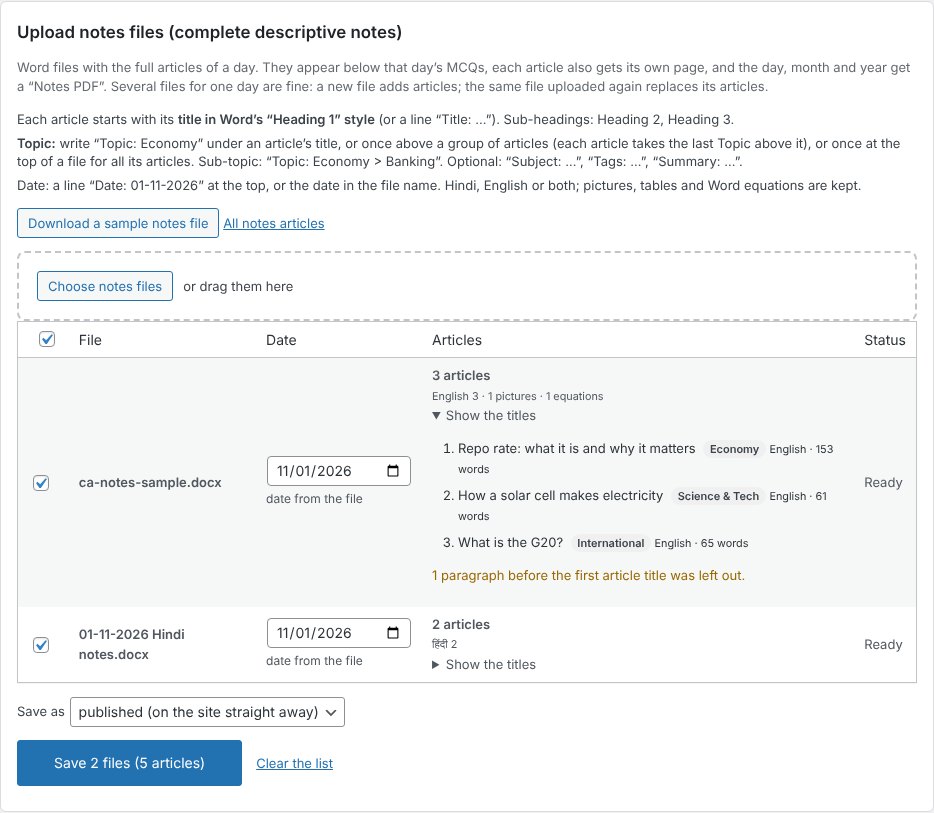
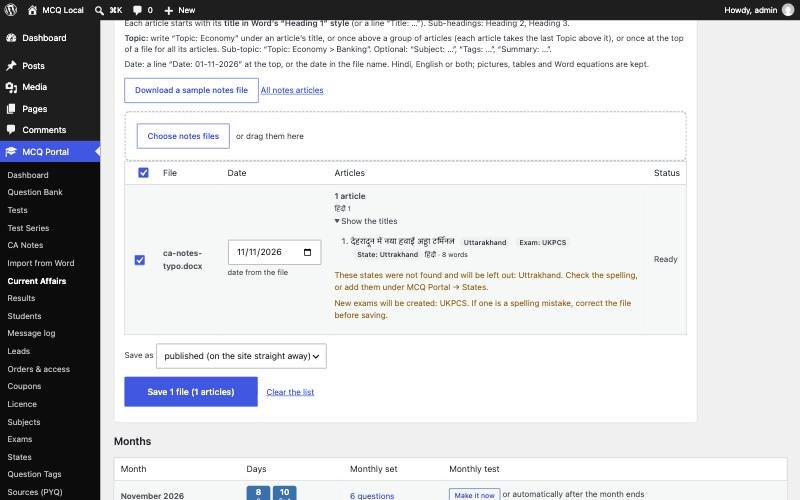
MCQ Portal → Current Affairs → “Upload notes files”: choose one or many files, for one or many days. The preview shows the articles and warns about anything it does not understand. A new file adds articles to its day; uploading the same file again replaces its own articles, and an article with the same title keeps its address.
Upload notes files for one or many days. Screenshot: MCQ Test Portal
The preview lists articles and warnings before import. Screenshot: MCQ Test Portal
What pages do the notes become?
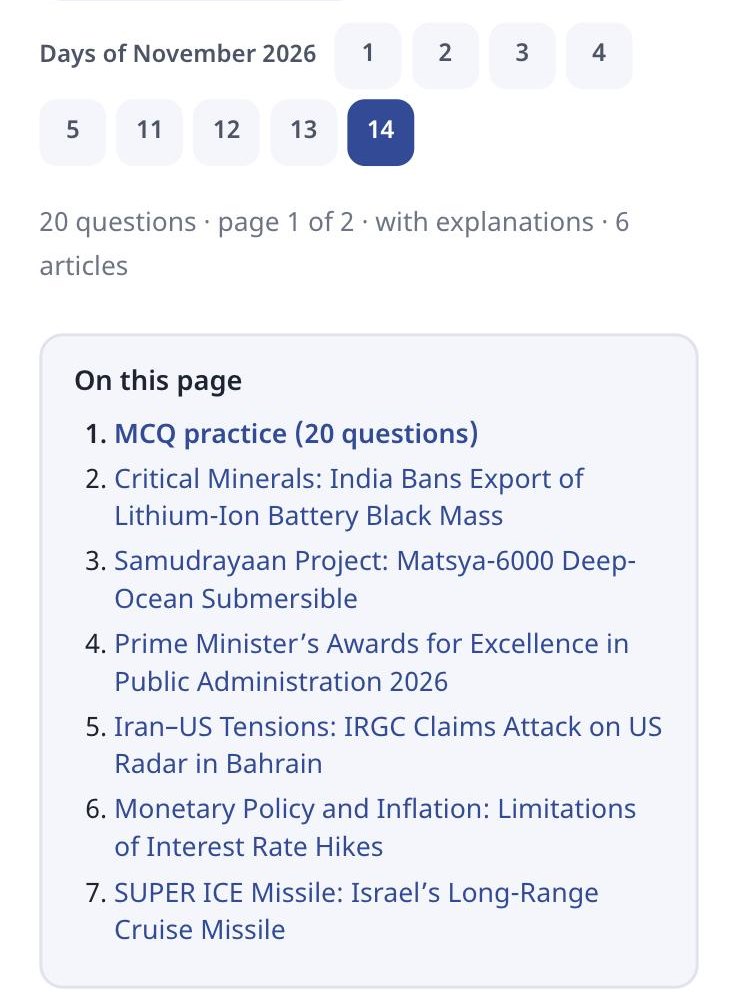
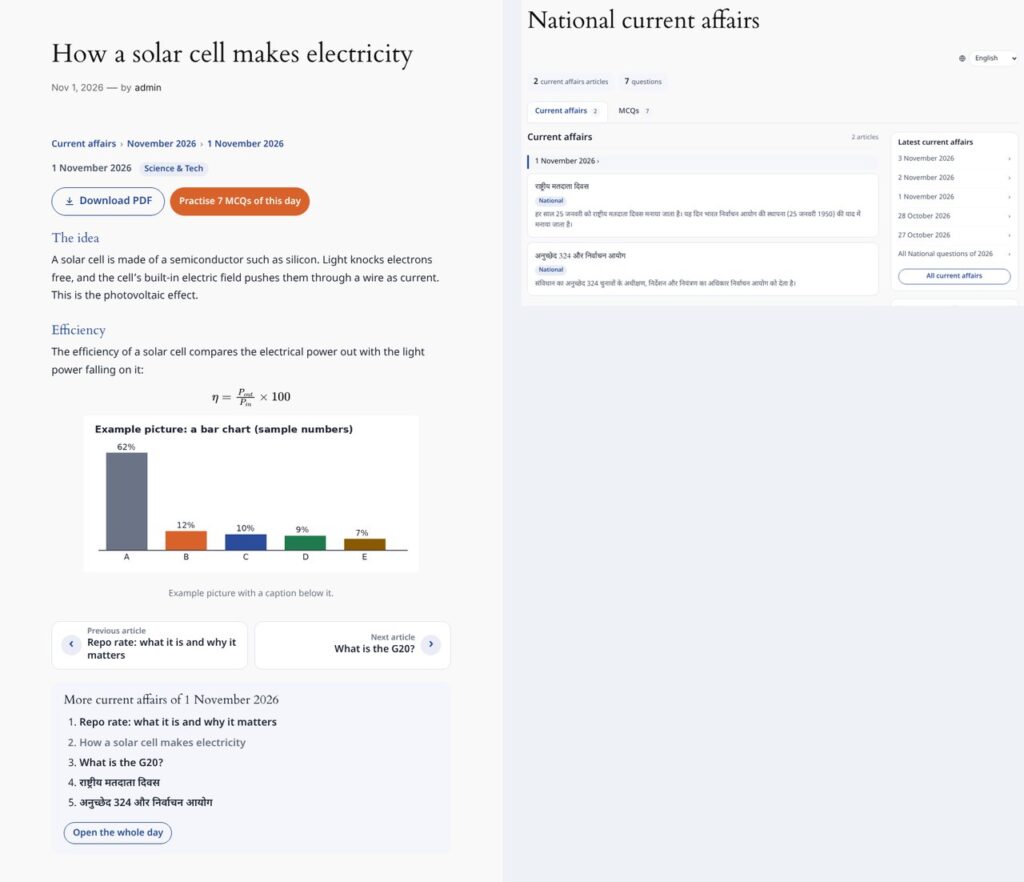
Each article gets its own page, and the day page puts the MCQs first and the full notes below them. The article page has a breadcrumb, date, topic links, its own PDF, previous and next article, the rest of the day, and a link to the day’s MCQs. The day page starts with “On this page” contents:
Shri RAJ IAS day page: “On this page”, MCQs and notes. Screenshot: shrirajias.com
An article page with breadcrumb, topic and PDF. Screenshot: MCQ Test Portal
Which Notes PDFs are made?
Notes PDFs are made in the background for every day, month and year, in your PDF design, with a contents list, page numbers and bookmarks.
PDF
Contains
Daily Notes PDF
That day’s articles
Monthly Notes PDF
All days of the month
Yearly Notes PDF
The monthly notes PDFs joined
Article PDF
One article
MCQ PDF
The questions, alongside each Notes PDF
The Notes PDF follows the student’s Hindi / English / Both choice, and carries your logo, header, footer and watermark. More on design in question paper PDF with your logo.
Notes PDF: cover, contents and articles. Screenshot: MCQ Test Portal
How do notes and MCQs work together?
Notes and MCQs from the same day reinforce each other. A student reads the Samudrayaan note, then answers the question on it a few lines below. Both are filed by topic, state and exam, so the topic pages show “Current affairs | MCQs” tabs together, and the monthly test tests what the notes taught.
How can you try it?
Send us one of your Word files. We switch the portal on for your website for a month and build your first test from it.
Equations come straight from your Word file and reach students as sharp images, in Hindi and English, with no maths software needed on their phones.
From Word: equations made with Word’s Insert → Equation, or LaTeX typed between $…$ (or $$…$$ on its own line), are read during the upload.
Drawn once, saved as images: the equation is drawn in your browser while you import and saved on your site as an SVG image plus a PNG copy. Students load a small image, so fractions, powers and matrices look the same on every phone.
Spoken alt text in two languages: each equation carries a description, for example “A equals the 2 by 2 matrix Row 1: 1 2 Row 2: 3 4” and “ए बराबर 2 बाय 2 आव्यूह पंक्ति 1: 1 2 पंक्ति 2: 3 4”, from our demo test.
Edit by hand: the question editor has a visual equation editor and a LaTeX box.
In PDFs too: downloadable PDFs keep the equations.
MathType: MathType equations come in as pictures; convert them in Word (MathType → Convert Equations) for sharp results.
Our Class 12 Maths demo was made from one Word file: 10 questions, 126 equations, no errors in the preview. Open it on your phone to see how it looks:
Equations in our demo test on a phone: fractions, powers and a matrix, in Hindi and English. Screenshot: amicasolution.com
Frequently asked questions
How do I upload current affairs notes from Word?
Give each article a Heading 1 title, add optional Topic, Summary, Exam or State lines, and upload the file in MCQ Portal → Current Affairs → Upload notes files.
Is a Notes PDF made automatically?
Yes. Daily, monthly and yearly Notes PDFs, and a PDF for each article, are made in the background in your PDF design.
Are tables, pictures and equations kept?
Yes. Headings, lists, tables with merged cells, pictures, captions, links and Word equations are kept.
Can notes be in Hindi?
Yes. Hindi, English or both; the language of each article is found automatically, and the PDF follows the student’s choice.
Is there a free trial?
Yes. Amica Solutions offers a 1-month free demo of the MCQ Test Portal on your own website. Message +91 94113 39575 on WhatsApp.