Wrong Answer Key in an Online Test? How to Find It, Fix It and Rescore Every Student (2026)
By the Amica Solutions Team · Published 16 November 2026 · Facts checked 16 November 2026. Amica Solutions builds the MCQ Test Portal, so the screenshots are from our own product and from coaching institutes that use it.
To fix a wrong answer key in an online test, find the question in the test analysis (many students choosing the same wrong option is the usual sign), correct the answer or mark the question Dropped or Bonus, then click Rescore. Every attempt and rank is recalculated and each student is told their result changed.
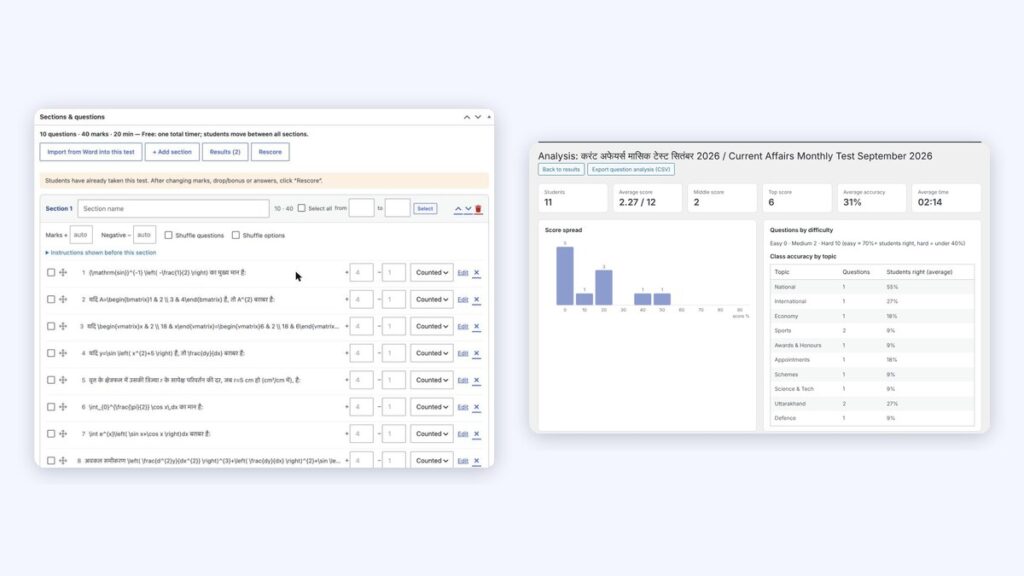
The Rescore notice (left) and the question-wise analysis (right). Screenshots: Amica Solutions
It happens to every coaching institute: a student messages after the test, “Sir, option C is also correct.” Sometimes they are right. In a paper test you correct the marks by hand. In an online test series with hundreds of attempts, you need the system to do it, fairly, for everyone.
This is the exact process in the MCQ Test Portal, from spotting the problem to telling students their result changed.
Key takeaways
The question-wise analysis points to suspect keys.
Correct, Drop or Bonus, depending on the problem.
One click rescores every attempt; students are told.
Version history keeps every old version.
Try it on your own site with the 1-month free demo.
How do you spot a wrong answer key?
Look at the question-wise table in the test analysis: a hard question where many students chose the same wrong option is the first suspect. The table shows, for every question, how many got it right, wrong or skipped, the most chosen wrong option, average time and difficulty worked out from real answers.
The teacher’s test analysis for a monthly current affairs test. Screenshot: MCQ Test Portal
Should you correct, drop or bonus the question?
Choose the fix that matches the problem.
Problem
Fix
Effect on students
The answer key was wrong
Edit the question and correct the answer
Marks recalculated against the new key
Two options are both correct
Change the type to allow more than one correct answer, or mark it Bonus
Fair marks for either answer, or marks for everyone
No option is correct, or the question is broken
Set the question to Dropped
The question no longer counts for anyone
Ambiguous wording
Set it to Bonus
Everyone gets the marks
Wrong marks or negative marks
Change the marks in the builder
Scores recalculated
How does rescoring work?
After the change, the test shows a notice and a Rescore button; one click recalculates every attempt. The test builder says “Students have already taken this test. After changing marks, drop/bonus or answers, click Rescore.” Every attempt is then recalculated, ranks update, and the result page tells each student that their result was updated:
The builder: Counted / Dropped / Bonus and the Rescore button. Screenshot: amicasolution.com admin
Is the old version of the question kept?
Old versions of each question are kept. The question editor keeps a version history, so you can see what changed and restore an earlier version if needed. Teachers can also export the question analysis as CSV to share with the faculty who set the paper.
Editing a question in Hindi and English. Screenshot: amicasolution.com admin
How do you prevent wrong keys in the first place?
A few habits stop most wrong keys before students see them.
Habit
Why
Read the import preview’s “Correct answers by option” chart
A key that is almost all “A” is usually a typing mistake
Fix questions flagged “Without explanation”
Writing the solution often reveals a wrong key
Take the test yourself once before publishing
You see exactly what students see
Check the analysis after the first 20 attempts
Catches errors before the whole batch sits the test
The same applies to daily current affairs: the date-sensitive facts behind a question can change, and the portal’s explanations, state-wise and exam-wise pages update with the question. See also negative marking and result analysis.
How can you try it?
Send us one of your Word files. We switch the portal on for your website for a month and build your first test from it.
Equations come straight from your Word file and reach students as sharp images, in Hindi and English, with no maths software needed on their phones.
From Word: equations made with Word’s Insert → Equation, or LaTeX typed between $…$ (or $$…$$ on its own line), are read during the upload.
Drawn once, saved as images: the equation is drawn in your browser while you import and saved on your site as an SVG image plus a PNG copy. Students load a small image, so fractions, powers and matrices look the same on every phone.
Spoken alt text in two languages: each equation carries a description, for example “A equals the 2 by 2 matrix Row 1: 1 2 Row 2: 3 4” and “ए बराबर 2 बाय 2 आव्यूह पंक्ति 1: 1 2 पंक्ति 2: 3 4”, from our demo test.
Edit by hand: the question editor has a visual equation editor and a LaTeX box.
In PDFs too: downloadable PDFs keep the equations.
MathType: MathType equations come in as pictures; convert them in Word (MathType → Convert Equations) for sharp results.
Our Class 12 Maths demo was made from one Word file: 10 questions, 126 equations, no errors in the preview. Open it on your phone to see how it looks:
Equations in our demo test on a phone: fractions, powers and a matrix, in Hindi and English. Screenshot: amicasolution.com
Frequently asked questions
Can I change the answer key after students take an online test?
Yes. Edit the question, then click Rescore on the test. Every attempt is recalculated and students see that their result was updated.
What is the difference between Dropped and Bonus?
Dropped removes the question from everyone’s score; Bonus gives everyone the marks for it.
How do I find a wrong answer key?
Open the test analysis and look for hard questions where many students chose the same wrong option. That pattern often means the key is wrong.
Is the old version of a question kept?
Yes. Each question has a version history, and an earlier version can be restored.
Is there a free trial?
Yes. Amica Solutions offers a 1-month free demo of the MCQ Test Portal on your own website. Message +91 94113 39575 on WhatsApp.