
How to Bulk Upload MCQs from Word: Import Hundreds of Hindi + English Questions at Once (2026)
By the Amica Solutions Team · Published 16 November 2026 · Checked against MCQ Test Portal 1.9.0 on 16 November 2026. Amica Solutions builds the MCQ Test Portal; every screenshot below is from a real upload.
To bulk upload MCQs, write each question as a two-column table in a Word (.docx) file (labels such as Question, Option, Answer and Solution on the left, values on the right), upload the file in the MCQ Test Portal, check the preview for errors, and click Import. One file can carry hundreds of questions, in Hindi and English, with Word equations and pictures.
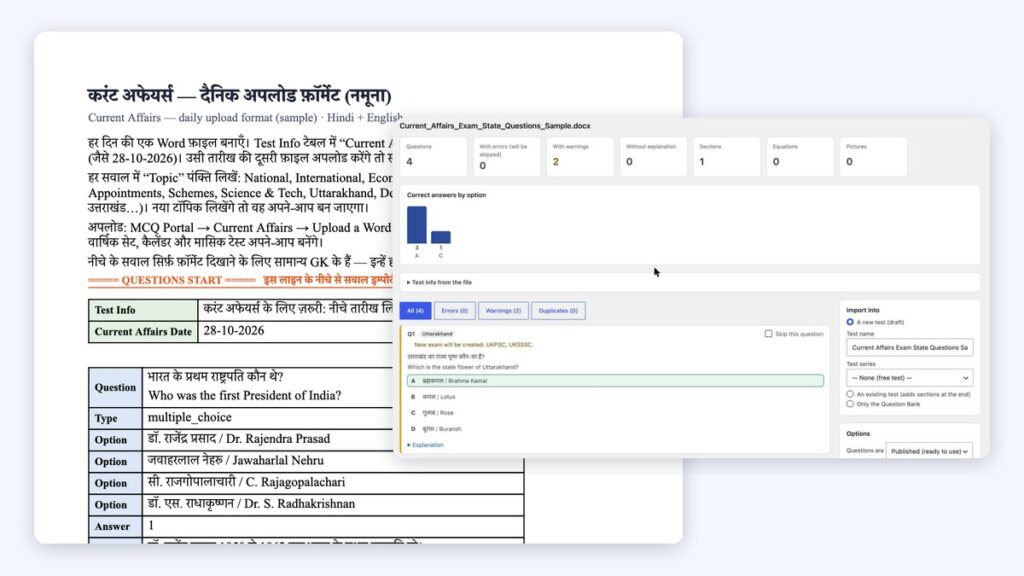
Left: a sample Word file. Right: the import preview after uploading a file. Screenshots: Amica Solutions
Every coaching institute has a cupboard, real or digital, full of Word question papers. Years of a teacher’s work sits there, and the usual way to put it online is to copy each question into a form, one option box at a time. Nobody keeps that up past the first fifty questions.
Bulk upload turns the whole file into questions in one step. Below we use real files and real screens: the sample Word file you can download, and the preview our own site showed when we uploaded it on 16 November 2026.
Key takeaways
- One two-column table per question: Question, Type, Option, Answer, Solution, plus optional Marks, Subject, Topic, Exam and State.
- Hindi and English sit in the same cell on separate lines. Kruti Dev / DevLys Hindi is converted to Unicode automatically.
- Word equations (Insert → Equation) become sharp images with alt text; pictures go into the Media Library.
- Nothing is saved until you click Import. The preview counts errors, warnings, duplicates and the spread of correct answers first.
- The same format uploads daily current affairs, filed by topic, exam and state. Try it on your own site with the 1-month free demo.
How should the Word file be laid out?
Each question is its own two-column table: the label on the left, the value on the right. This is a real sample file, open in Word:

The daily current affairs sample, open in Word: one table per question. Screenshot: sample Word file
| Label | What to write | Required? |
|---|---|---|
| Question | The question; Hindi line, then English line | Yes |
| Type | multiple_choice (one answer) or multiple_select (several) | Yes |
| Option (or Option 1 … 10, A … J) | One row per option; at least two | Yes |
| Answer | 1, A, or 1,3 for several | Yes |
| Solution | Explanation shown after the test | Recommended |
| Marks / Negative Marks | For example 4 and 1 | Optional |
| Subject, Topic, Difficulty, Tags, Source | Use > for sub-topics, e.g. Geography > Uttarakhand | Optional |
| Exam, State | e.g. UKPSC, UKSSSC and Uttarakhand | Optional |
Two extra tables are optional. A Section table starts a new section with its own time and marks, and a Test Info table names the test and sets its total time. Put the line ==== QUESTIONS START ==== under any instructions you keep at the top of the file; everything above it is ignored.
Download real samples: daily current affairs (Hindi + English), Class 12 Maths with equations and questions with Exam and State rows.
How do you bulk upload the file?
Open Import from Word, drop the .docx file, read the preview, choose where the questions go, and click Import.
- In WordPress, go to MCQ Portal → Import from Word. The screen also has a blank template and a sample paper to download.
- Drop your file in the box. It must be a .docx file (open old .doc files in Word and use Save As), up to 50 MB.
- Read the preview and fix anything it flags in Word, or tick “Skip this question”.
- Choose Import into: a new test (saved as a draft), an existing test (new sections are added at the end), or only the Question Bank.
- Choose whether questions are published straight away or saved as drafts, and what to do with questions already in the bank. Then click Import.

MCQ Portal → Import from Word, with the format rules and template downloads. Screenshot: amicasolution.com admin
What does the preview check before anything is saved?
The preview reads the whole file and shows what will happen, so you can fix mistakes before they reach students. When we uploaded the exam and state sample, it found 4 questions, no errors and 2 warnings, both saying a new exam would be created (UKPSC, UKSSSC and BPSC):
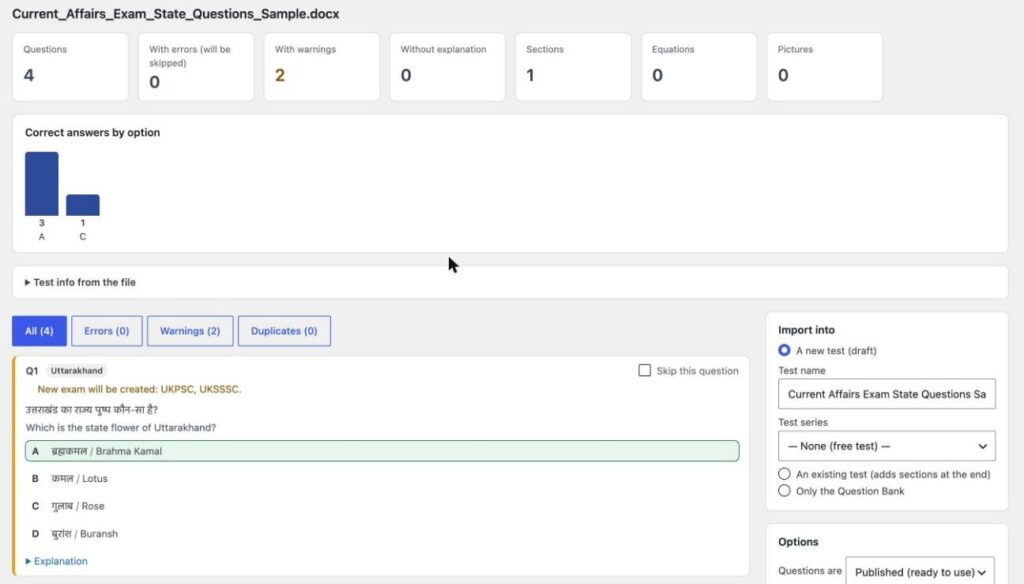
The real preview for the exam and state sample, 16 November 2026. Nothing is saved until Import. Screenshot: amicasolution.com admin
| Preview shows | Why it matters |
|---|---|
| Questions | How many questions the file holds |
| With errors (will be skipped) | Questions that cannot be imported until fixed |
| With warnings | Imported, but worth a look (new exam, legacy font, extra columns) |
| Without explanation | Questions with no Solution row |
| Sections, Equations, Pictures | What the file contains |
| Duplicates | Repeats inside the file, or questions already in your bank |
| Correct answers by option | A quick check that the answer key is not all “A” |
How are Hindi, equations, pictures and Kruti Dev handled?
Most of it is automatic; a few old formats need one step in Word first.
- Hindi + English: write the Hindi line, then the English line, in the same cell, or use separate rows such as
Question EN. Options can be writtenहिंदी / English. - Kruti Dev / DevLys: converted to Unicode automatically, with a warning asking you to check the spelling. Text in other legacy fonts such as Chanakya cannot be converted and must be retyped in a Unicode font.
- Equations: use Word’s Insert → Equation or type LaTeX between
$…$. They become sharp images with spoken alt text. MathType equations come in as pictures; convert them in Word (MathType → Convert Equations) for sharp results. - Pictures: go into the Media Library. WMF/EMF pictures are skipped because browsers cannot show them, so paste those as PNG.
Our demo test was made this way: 10 Class 12 Maths questions with 126 equations, from one Word file, with no errors in the preview. You can take that test now, no login needed.
What are the common upload errors, and how do you fix them?
Almost every error is a small table problem that takes seconds to fix in Word. These are the messages the importer shows, and what to do:
| Message | Fix |
|---|---|
| The Answer row is empty | Add the correct option number or letter |
| Answer “5” does not match any of the 4 options | Check the answer, or add the missing option row |
| At least two options are needed | Add the missing Option rows |
| Several answers are given but the Type is multiple_choice | Change Type to multiple_select |
| Hindi has 3 lines but English has 2 | Put each statement on its own line in both languages |
| Row “…” was not recognised and was skipped | Use one of the standard labels |
| Please upload a Word .docx file | Open the .doc file in Word and Save As .docx |
| Same as question 3 in this file | A repeat; skip it or keep it on purpose |
The full label list is in our Word import guide.
Can you bulk upload current affairs, state-wise and exam-wise?
Yes. Add a “Current Affairs Date” row and a Topic for each question, and the file becomes that day’s current affairs. Monthly and yearly sets, the calendar and an automatic monthly test update by themselves. You can drop several days’ files at once:

Uploading several current affairs days at once. Screenshot: MCQ Test Portal
- Exam-wise: an
Examrow (several with commas, or “All exams”) puts the question on pages such as UKPSC or BPSC. - State-wise: a
Staterow (English or Hindi name, or short forms like UK or UP) puts it on that state’s page. - Subject-wise and topic-wise: the Topic and Subject rows build topic pages such as Economy or Polity.
- Notes: full descriptive articles upload from Word too, with their own pages and a Notes PDF (notes sample).
Coaching institutes already publish this way. Shri RAJ IAS had nine November days online by 14 November 2026, with 152 questions and 12 notes articles, and Inspiration Study Circle adds 20 questions a day, 388 in 2026 so far (both checked on 15 November 2026). More in the current affairs guide.
How can you try it with your own question file?
Send us one of your Word files and we will set up the portal on your website for a 1-month free demo. Your teachers see their own questions as a live test, with timer, negative marking and results, before you decide anything.
- Take our demo test and see the current affairs demo.
- Next steps: build a test series (Hindi) and sell it online.
- Read about the MCQ Test Portal.
Get the 1-month free demo on WhatsAppTake the live demo test
Frequently asked questions
Can I upload MCQs in bulk from a Word file?
Yes. Put each question in a two-column table (Question, Type, Option, Answer, Solution) in a .docx file and upload it under MCQ Portal → Import from Word. One file can hold hundreds of questions.
Does bulk upload work with Hindi questions?
Yes. Hindi and English can sit in the same cell on separate lines. Kruti Dev and DevLys text is converted to Unicode automatically; other legacy fonts such as Chanakya need retyping in Unicode.
Will maths equations upload correctly?
Yes, if they are Word equations (Insert → Equation) or LaTeX between $ signs. They become sharp images with alt text. MathType equations come in as pictures unless you convert them in Word first.
What is the maximum file size?
50 MB per .docx file. Old .doc files must be saved as .docx first.
Is there a free trial?
Yes. Amica Solutions offers a 1-month free demo of the MCQ Test Portal on your own website. Message +91 94113 39575 on WhatsApp and send one of your Word files.
Sources (checked 16 November 2026)
- MCQ Test Portal: Word import guide and the plugin’s import screen (version 1.9.0)
- Microsoft Support: Write an equation or formula
- Shri RAJ IAS: current affairs page
- Inspiration Study Circle: current affairs page


